An audio interface is an essential piece of equipment for anyone who wants to record music, podcasts, or other audio content. It acts as a bridge between your computer and your instruments or microphones, allowing you to record and playback high-quality audio.
Audio interfaces come in a variety of shapes and sizes, with different features and capabilities to suit different needs. Some have a single input for a microphone or instrument, while others have multiple inputs for recording a whole band. They may also have built-in preamps, EQ, and other processing tools to help you get the sound you want.
Whether you’re a professional musician or just starting out, an audio interface can make a big difference in the quality of your recordings. By providing a clean and reliable connection between your instruments and your computer, it ensures that your recordings sound as good as they can be. So if you’re serious about recording music or other audio content, investing in a good audio interface is definitely worth considering.
What is an Audio Interface
If you’re a musician, podcaster, or content creator, an audio interface is a device that you should be familiar with. An audio interface is essentially a high-quality sound card that connects to your computer and allows you to record and playback audio. It’s an essential tool for anyone who wants to create high-quality audio content.
An audio interface provides several functions, including analog to digital conversion (ADC) and digital to analog conversion (DAC). Most audio interfaces feature multiple channels of each, allowing you to record and playback multiple sources of audio simultaneously.
Audio interfaces come in a variety of shapes and sizes, with different features and capabilities. Some are designed for home studios, while others are designed for professional recording studios. When choosing an audio interface, it’s important to consider your specific needs and budget.
One of the key benefits of using an audio interface is the ability to achieve high-quality audio recordings. Audio interfaces are designed to provide clean, transparent audio recordings that accurately capture the sound of your source material. With the right audio interface and microphone, you can achieve professional-quality recordings that sound great on any platform.
an audio interface is an essential tool for anyone who wants to create high-quality audio content. Whether you’re a musician, podcaster, or content creator, investing in a high-quality audio interface can help you achieve the best possible sound for your recordings.
Types of Audio Interfaces
When it comes to audio interfaces, there are several types available in the market. Each type has its own set of features and capabilities. In this section, we will take a look at the most common types of audio interfaces.
USB Audio Interface
USB audio interfaces are the most popular type of audio interfaces available. They are affordable, easy to use, and compatible with most computers. USB audio interfaces are designed to connect to your computer via USB, and they typically come with multiple inputs and outputs, allowing you to connect various instruments and microphones.
Some of the most popular USB audio interfaces include the Focusrite Scarlett 2i2, Behringer U-Phoria UM2, and PreSonus AudioBox USB 96.
Thunderbolt Audio Interface
Thunderbolt audio interfaces are designed for professional use. They are faster and more reliable than USB audio interfaces, making them ideal for recording and producing high-quality audio. Thunderbolt audio interfaces are compatible with Mac computers and some Windows computers that have Thunderbolt ports.
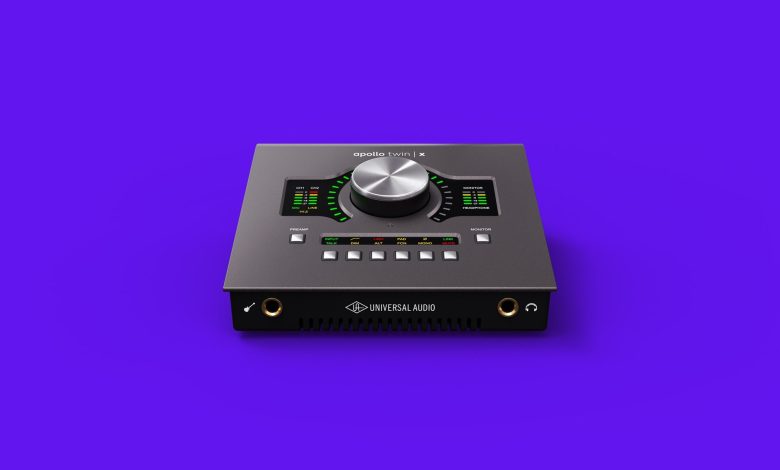
Some of the most popular Thunderbolt audio interfaces include the Universal Audio Apollo Twin X, Antelope Audio Zen Tour, and Apogee Element 88.
Firewire Audio Interface
Firewire audio interfaces are similar to Thunderbolt audio interfaces in terms of speed and reliability. They are designed for professional use and are compatible with Mac computers and some Windows computers that have Firewire ports. Firewire audio interfaces typically come with multiple inputs and outputs, allowing you to connect various instruments and microphones.
Some of the most popular Firewire audio interfaces include the MOTU 828es, PreSonus FireStudio Project, and Focusrite Saffire Pro 40.
Ethernet Audio Interface
Ethernet audio interfaces are designed for professional use in large recording studios. They are faster and more reliable than USB and Firewire audio interfaces, making them ideal for recording and producing high-quality audio. Ethernet audio interfaces are compatible with Mac and Windows computers and require a dedicated Ethernet connection.
Some of the most popular Ethernet audio interfaces include the Focusrite RedNet 4, RME Digiface Dante, and MOTU AVB Switch.
when choosing an audio interface, it’s important to consider your specific needs and budget. Whether you’re a beginner or a professional, there is an audio interface out there that will suit your needs.
Key Components of an Audio Interface
An audio interface is a device that allows you to record and playback audio on your computer. It is an essential tool for musicians, podcasters, and other audio professionals. Here are the key components of an audio interface:
Inputs and Outputs
An audio interface has several inputs and outputs that allow you to connect different types of audio equipment to your computer. Mic inputs, line outputs, and instrument inputs are the most common types of inputs and outputs. Mic inputs are used to connect microphones, line outputs are used to connect speakers or amplifiers, and instrument inputs are used to connect guitars or keyboards.
Preamps
Preamps are essential components of an audio interface that amplify the signal from a microphone or instrument to a level that can be recorded by your computer. A good preamp can make a big difference in the quality of your recordings. Look for an audio interface with high-quality preamps if you want to achieve professional-level recordings.
Converters
Converters are components that convert analog audio signals to digital signals and vice versa. They are essential for recording and playback of audio. A high-quality converter can make a big difference in the clarity and detail of your recordings.
Headphone Outputs
Headphone outputs are essential components of an audio interface that allow you to monitor your recordings. They are used to connect headphones to your interface so you can hear what you are recording and make adjustments as necessary.
MIDI
MIDI is a protocol that allows you to connect electronic musical instruments to your computer. An audio interface with MIDI inputs and outputs allows you to connect MIDI keyboards, drum machines, and other MIDI devices to your computer.
an audio interface is a device that allows you to record and playback audio on your computer. It has several key components, including inputs and outputs, preamps, converters, headphone outputs, and MIDI. When choosing an audio interface, look for high-quality components that will help you achieve professional-level recordings.
Understanding Latency in Audio Interfaces
Latency is the time it takes for an audio signal to travel through an audio interface and be processed by a computer’s digital audio workstation (DAW). Latency is a common issue for audio interface users, and it can cause problems such as audio delay and timing issues.
Latency is measured in milliseconds (ms), and it is affected by several factors, including buffer size, sample rate, and processing power. The larger the buffer size, the higher the latency, but the more stable the audio will be. On the other hand, a smaller buffer size will result in lower latency, but it may cause audio dropouts and glitches.
Zero-latency monitoring is a feature that allows you to monitor your audio input without any delay. This is achieved by routing the audio directly to your headphones or speakers, bypassing the computer’s processing. This is especially useful for recording musicians who need to hear themselves in real-time.
Some audio interfaces come with built-in DSP (digital signal processing) that can reduce latency by processing audio directly on the interface. This can be helpful for recording live performances or using software instruments in real-time.
It is important to note that latency is not always avoidable, but it can be managed. By adjusting your buffer size, sample rate, and using zero-latency monitoring, you can minimize latency and improve the overall performance of your audio interface.
understanding latency is crucial for anyone working with audio interfaces. By knowing how it works and how to manage it, you can ensure that your recordings and performances are free from timing issues and audio delay.
The Role of Sample Rate and Bit Depth
When it comes to audio interfaces, sample rate and bit depth are two important terms that you should be familiar with.
Sample Rate: The sample rate refers to the number of samples of audio taken per second. The higher the sample rate, the more accurately the audio is captured. Common sample rates are 44.1 kHz, 48 kHz, 88.2 kHz, and 96 kHz. A higher sample rate can capture higher frequencies and nuances in the sound, but it also requires more storage space and processing power.
Bit Depth: The bit depth refers to the number of bits of information captured per sample. The higher the bit depth, the more accurately the audio is represented. Common bit depths are 16-bit and 24-bit. A higher bit depth can capture a greater dynamic range and reduce quantization noise.
Most audio interfaces support 24-bit recording, which provides a higher dynamic range than 16-bit and is the industry standard for most professional recordings.
When choosing an audio interface, it’s important to consider the sample rate and bit depth that you’ll be recording at. Higher sample rates and bit depths provide better audio quality, but also require more storage space and processing power.
In general, a sample rate of 48 kHz and a bit depth of 24-bit are a good balance between audio quality and practicality. However, if you’re recording music with a lot of high-frequency content or subtle nuances, you may want to consider a higher sample rate, such as 96 kHz, to capture those details more accurately.
It’s also important to note that not all audio interfaces support all sample rates and bit depths, so be sure to check the specifications of the interface before making a purchase.
Connecting Instruments and Microphones
When it comes to recording music or podcasting, connecting instruments and microphones is essential. An audio interface allows you to connect multiple inputs to your computer, making it possible to record a variety of sounds. Here’s what you need to know about connecting instruments and microphones to your audio interface.
Microphones
To connect a microphone to your audio interface, you’ll need an XLR cable. XLR cables are balanced cables that help reduce noise and interference. Plug one end of the XLR cable into your microphone and the other end into the XLR microphone input on your audio interface.
If your microphone requires phantom power, make sure to turn it on before you start recording. Phantom power is a feature that provides power to condenser microphones through the XLR cable.
Instruments
Connecting instruments to your audio interface is a little different than connecting microphones. Most audio interfaces have at least one instrument input, which is typically a high-impedance 1/4-inch jack. This input is designed to handle the signal from an electric guitar or bass.
If you’re using a keyboard or other instrument that has a line-level output, you’ll need to connect it to one of the line-level inputs on your audio interface. Line-level inputs are typically balanced 1/4-inch TRS jacks.
Mic Preamps
Mic preamps are an important part of any audio interface. They amplify the signal from your microphone or instrument and help improve the sound quality. Most audio interfaces have at least one mic preamp, but some higher-end models have multiple mic preamps.
If you’re recording multiple microphones at the same time, make sure to use a mic preamp for each microphone. This will help ensure that each microphone is properly amplified and that you get the best possible sound quality.
connecting instruments and microphones to your audio interface is easy once you know what to do. Make sure to use the right cables and inputs, turn on phantom power if necessary, and use mic preamps to improve the sound quality. With these tips, you’ll be able to record high-quality audio in no time!
Audio Interfaces for Different Devices
When it comes to choosing an audio interface, it’s important to consider the device you’ll be using it with. Here are some options for different devices:
Audio Interfaces for PC
If you’re using a PC, you’ll want to make sure the audio interface is compatible with your operating system. Many audio interfaces are designed to work with Windows, so you shouldn’t have any trouble finding one that works for you. Some popular options include:
- Focusrite Scarlett 2i2
- PreSonus AudioBox USB 96
- Behringer U-Phoria UM2
Audio Interfaces for Mac
If you’re using a Mac, you’ll want to make sure the audio interface is compatible with macOS. Many audio interfaces are designed to work with Macs, so you shouldn’t have any trouble finding one that works for you. Some popular options include:
- Apogee Duet
- Universal Audio Apollo Twin MkII
- MOTU UltraLite-mk4
Audio Interfaces for iOS Devices
If you’re using an iOS device, such as an iPhone or iPad, you’ll want to make sure the audio interface is compatible with iOS. Some audio interfaces are specifically designed to work with iOS devices, while others require an adapter. Some popular options include:
- Focusrite iTrack Solo
- Apogee Jam+
- IK Multimedia iRig Pro Duo
No matter what device you’re using, there are plenty of audio interfaces available to choose from. Just make sure to do your research and choose one that meets your specific needs.
Choosing the Right Audio Interface
When it comes to choosing the right audio interface, there are a few things to consider to ensure that you get the best device for your needs. Here are some factors to keep in mind:
Budget Considerations
One of the most important factors to consider when choosing an audio interface is your budget. Audio interfaces can range in price from under $100 to over $1000. It’s important to determine how much you’re willing to spend before you start shopping around. Keep in mind that a higher price doesn’t always mean better quality, but it can provide more features and better performance.
Technical Specifications
Another important factor to consider when choosing an audio interface is the technical specifications. These specifications include the number of inputs and outputs, the type of connections (USB, Thunderbolt, etc.), the sample rate and bit depth, and the dynamic range. It’s important to choose an audio interface that has the right number of inputs and outputs for your needs, as well as the right type of connections to work with your computer. The sample rate and bit depth will determine the quality of the audio that you’re recording or playing back, while the dynamic range will determine how much detail you can capture in your recordings.
When it comes to technical specifications, it’s important to choose an audio interface that is compatible with your computer’s operating system and software. Many audio interfaces are designed to work with specific software, so be sure to check compatibility before making a purchase.
Best Audio Interfaces
If you’re looking for the best audio interfaces on the market, there are a few that stand out. The Universal Audio Apollo Twin MkII is a popular choice for professional musicians and producers, while the Focusrite Scarlett 2i2 is a great option for those on a budget. The PreSonus Studio 192 is another high-quality audio interface that offers a range of features and connectivity options.
Upgrade
Finally, if you’re upgrading from an older audio interface, it’s important to consider how the new device will fit into your existing setup. Make sure that the new audio interface is compatible with your existing equipment and software, and that it offers the features and performance that you need to take your recordings to the next level.
choosing the right audio interface requires careful consideration of your budget, technical specifications, and compatibility with your existing setup. Keep these factors in mind when shopping for an audio interface, and you’ll be sure to find the best device for your needs.
Audio Interfaces in Music Production
An audio interface is an essential tool for musicians and artists who want to record their music. It is a piece of hardware that connects your musical instrument or microphone to your computer, allowing you to record, edit, and mix your music. In this section, we will discuss how audio interfaces are used in music production.
Recording
Audio interfaces are used to record music, and they offer a variety of recording sample rates and bit depths. These settings affect the quality of the recording input and output. A common setting for music production is 44.1kHz at 24-bits, while 48kHz 24-bit is used for multimedia projects. Some interfaces feature 96kHz 24-bit sampling rates for enhanced quality.
Studio Setup
An audio interface is an essential component of any studio setup. It connects your musical instrument or microphone to your computer, allowing you to record, edit, and mix your music. It is also used to connect other studio equipment, such as MIDI controllers and synthesizers.
In-the-Box
Audio interfaces are used in conjunction with digital audio workstations (DAWs), which are software programs used for recording, editing, and mixing music. With an audio interface, you can record your music directly into your DAW and use software plugins to add effects, EQ, and other processing.
Studio Monitors
Studio monitors are specialized speakers used in music production studios to accurately reproduce sound. Audio interfaces are used to connect studio monitors to your computer, allowing you to hear your music accurately.
audio interfaces are an essential tool for musicians and artists who want to record their music. They are used to connect musical instruments and microphones to computers, allowing for high-quality recording, editing, and mixing. They are also used to connect other studio equipment, such as MIDI controllers and synthesizers, and to connect studio monitors for accurate sound reproduction.
Audio Interfaces for Podcasting
When it comes to podcasting, having a reliable audio interface is crucial for producing high-quality audio content. An audio interface is a device that connects your microphone and other audio equipment to your computer, allowing you to record and edit your podcast audio.
There are many audio interfaces available on the market, but not all of them are suitable for podcasting. When choosing an audio interface for your podcast, consider the following factors:
- Number of inputs: If you plan on having multiple guests on your podcast, look for an audio interface with multiple inputs so you can record everyone’s audio separately.
- Preamp quality: A good preamp is essential for capturing clear and accurate sound. Look for an audio interface with high-quality preamps that can handle a wide range of microphones.
- Compatibility: Make sure the audio interface you choose is compatible with your computer and recording software.
- Talkback functionality: Some audio interfaces come with a “talkback” feature that allows you to communicate with your guests while recording. This can be useful for giving direction or feedback during the recording process.
Here are a few audio interfaces that are popular among podcasters:
| Audio Interface | Number of Inputs | Preamp Quality | Compatibility | Talkback Functionality |
|---|---|---|---|---|
| PreSonus AudioBox USB 96 | 2 | Excellent | Mac/PC | No |
| Focusrite Scarlett 2i2 | 2 | Excellent | Mac/PC | No |
| Zoom H6 | 4 | Good | Mac/PC | Yes |
The PreSonus AudioBox USB 96 is a budget-friendly option that offers excellent sound quality and two inputs for recording. The Focusrite Scarlett 2i2 is another popular choice among podcasters and offers high-quality preamps and easy compatibility with Mac and PC.
If you’re looking for an audio interface with more inputs, the Zoom H6 is a versatile option that can handle up to four inputs and even includes a talkback feature for communication during recording.
choosing the right audio interface for your podcast is crucial for producing high-quality audio content. Consider your specific needs and budget when making your choice, and don’t be afraid to invest in a high-quality audio interface for the best possible results.
Popular Audio Interface Brands
When it comes to audio interfaces, there are several popular brands that come to mind. These brands are known for their quality, reliability, and versatility. Let’s take a look at some of the most popular audio interface brands on the market today.
Apogee
Apogee is a well-known brand in the audio industry, and they offer a range of audio interfaces for both Mac and PC users. Their products are known for their high-quality preamps, converters, and overall sound quality. Some of their popular products include the Apogee Duet, Apogee Quartet, and Apogee Symphony Desktop.
Avid
Avid is another popular brand that offers a range of audio interfaces for both home and professional use. Their products are known for their compatibility with Pro Tools, one of the most popular DAWs on the market. Some of their popular products include the Avid Mbox, Avid Eleven Rack, and Avid Pro Tools | Carbon.
Universal Audio (UAD)
Universal Audio is a brand that is known for their high-quality analog emulations and plugins. They offer a range of audio interfaces that feature their proprietary UAD-2 processing technology, which allows users to run their plugins in real-time with near-zero latency. Some of their popular products include the Universal Audio Apollo Twin, Universal Audio Apollo X, and Universal Audio Arrow.
These are just a few of the most popular audio interface brands on the market today. When choosing an audio interface, it’s important to consider your specific needs and budget. Whether you’re a home studio owner or a professional recording engineer, there is an audio interface out there that will meet your needs.