

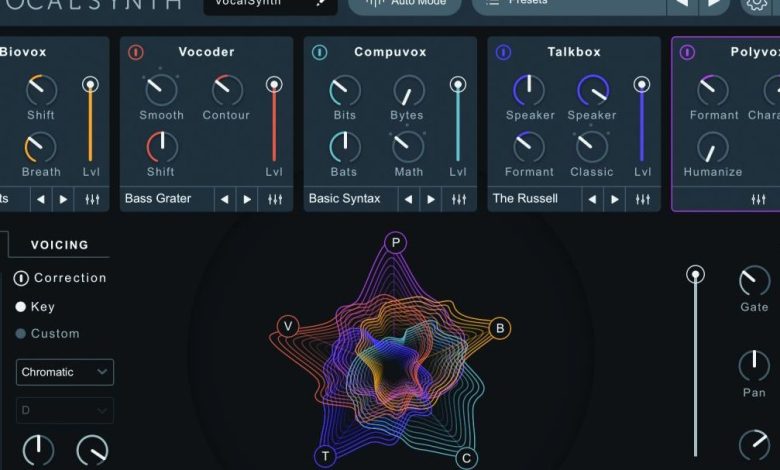
Are you interested in learning how to vocode audio or video? Vocoder is an audio effect that is used to create a robotic or electronic sound by analyzing the characteristics of the human voice and applying them to a synthesizer or other audio source. It is a popular effect used in music production, sound design, and film and television post-production.
To vocode something, you will need a vocoder plugin or software. Some popular options include Audacity, FL Studio, and Ableton Live. Once you have your software set up, you can start experimenting with different audio sources and carriers to create unique sounds. For example, you can use white noise or a synthesized chord as a carrier to create a more robotic sound, or use a musical tone for a more subtle effect.
Whether you are a musician looking to add a unique element to your tracks, or a sound designer working on a film or video project, learning how to vocode can be a fun and creative process. With the right tools and a bit of experimentation, you can create unique and interesting sounds that will set your work apart.
Understanding the Basics of Vocoder
What is a Vocoder
A vocoder is a device or software that analyzes the characteristics of a modulator signal, usually a voice, and applies these characteristics to a carrier signal, usually a synthesizer. The result is a synthesized sound that resembles the modulator’s voice.
History of Vocoder
The vocoder was invented by Bell Labs engineer Homer Dudley in the 1930s as a way to reduce the bandwidth required for long-distance telephone calls. The original vocoder used band-pass filters to analyze the modulator signal and apply its formants to the carrier signal.
Types of Vocoders
There are two main types of vocoders: channel vocoders and formant vocoders. Channel vocoders analyze the modulator signal and apply its amplitude envelope to the carrier signal. Formant vocoders analyze the modulator signal’s formants and apply them to the carrier signal.
Modern vocoders use digital signal processing (DSP) to analyze and synthesize the signals. They are often used in music production to create robotic or otherworldly vocal effects.
To use a vocoder, you’ll need a modulator signal, such as a voice, and a carrier signal, such as a synthesizer. You’ll also need an EQ to shape the modulator signal’s frequency response, and a synthesizer to generate the carrier signal.
vocoders are powerful tools for creating unique and interesting sounds in music production. With a basic understanding of how they work, you can experiment with different settings and create your own distinctive sound.
How to Set Up a Vocoder
If you’re looking to create robotic vocals or add a unique touch to your music, setting up a vocoder is a great way to do it. Here’s a step-by-step guide on how to set up a vocoder.
Choosing the Right Vocoder
Before setting up your vocoder, it’s important to choose the right one for your needs. There are many different types of vocoders available, each with their own unique features and capabilities. Some popular options include:
- Vocodex: a popular vocoder plugin for FL Studio
- Sytrus: a powerful synthesizer that includes a vocoder module
- Logic’s built-in vocoder: included with Apple’s Logic Pro software
- Ableton’s built-in vocoder: included with Ableton Live software
Consider the features you need, your budget, and the software you’re using before choosing a vocoder.
Setting Up the Vocoder on Your Device
Once you’ve chosen the right vocoder for your needs, it’s time to set it up. Here’s how to set up a vocoder on your device:
-
Open your DAW (digital audio workstation) software and create a new project.
-
Create a new mixer track and add your modulator to it. This could be a microphone or any other audio source you want to use to modulate the carrier signal.
-
Create another mixer track and add your carrier to it. This could be a synth or any other audio source you want to use as the carrier signal.
-
Add an EQ to your carrier track and adjust it to your liking. This will help you shape the sound of your carrier signal.
-
Add the vocoder plugin to your modulator track.
-
Configure the vocoder plugin to use the carrier track as the carrier signal.
-
Adjust the settings on the vocoder plugin to achieve the desired effect. This may include adjusting the number of vocoder bands, the amplitude of the original audio, and the amplitude of white noise.
-
Play around with the settings until you achieve the desired sound.
That’s it! With these simple steps, you can set up a vocoder and start experimenting with robotic vocals and unique sound effects.
Working with Modulator and Carrier Signals
Understanding Modulator Signals
The modulator signal is the audio signal that will be used to modulate the carrier signal. Typically, the modulator signal is a human voice, but it can also be any other audio signal. The modulator signal is often processed to enhance certain characteristics, such as formants, which are the resonant frequencies of the vocal tract that give each vowel its unique sound.
Understanding Carrier Signals
The carrier signal is the audio signal that will be modulated by the modulator signal. The carrier signal is usually a synthesized sound, such as an oscillator or a white noise generator. The carrier signal should be rich in harmonic content to create a complex sound that can be modulated by the modulator signal.
Balancing Modulator and Carrier Signals
To create a good vocoded sound, it is important to balance the modulator and carrier signals. The modulator signal should be loud enough to be heard over the carrier signal, but not so loud that it overpowers the carrier signal. The carrier signal should be loud enough to provide a solid foundation for the modulator signal, but not so loud that it dominates the sound.
When balancing the modulator and carrier signals, it is important to pay attention to the frequency bands that are being used. A vocoder typically uses a series of bandpass filters to isolate specific frequency bands in the modulator signal. These frequency bands are then used to modulate the carrier signal. The number of frequency bands and their parameters can be adjusted to create different sounds.
working with modulator and carrier signals is an important part of creating a vocoded sound. Understanding the characteristics of the modulator and carrier signals, and how to balance them, is key to creating a great-sounding vocoded sound.
Vocoding Technique
Vocoding is a technique that allows you to manipulate and transform audio signals to create unique sound effects. Here are some tips on how to vocode your audio using Audacity:
Adjusting the Parameters
Before you start vocoding, you need to adjust the parameters to achieve the desired effect. The parameters include the bandwidth, envelope, depth, and gain. The bandwidth controls the range of frequencies that are used in the vocoding process. The envelope controls the shape of the modulation applied to the carrier signal. The depth controls the amount of modulation applied to the carrier signal. The gain controls the overall volume of the vocoded signal.
Applying Effects
Once you have adjusted the parameters, you can apply effects to the vocoded signal. Effects such as EQ can be used to shape the sound of the vocoded signal. You can also use automation to change the parameters over time, creating dynamic and evolving sounds.
Tuning and Transmission
Tuning is an important part of vocoding. You need to make sure that the carrier signal and the modulator signal are in the same key. This will ensure that the vocoded signal sounds musical and harmonious. Transmission is another important aspect of vocoding. You need to make sure that the vocoded signal is transmitted correctly to the output device. This can be done by adjusting the cutoff frequency and other parameters.
vocoding is a powerful technique that can be used to create unique and interesting sound effects. By adjusting the parameters, applying effects, and tuning the signal, you can achieve amazing results. With practice and experimentation, you can take your vocoding skills to the next level.
Vocoding in Different Genres
Vocoders have become a staple in various music genres, from pop to electronic music and hip-hop. Let’s take a closer look at how vocoding is used in different genres and some examples of artists who have mastered this technique.
Vocoding in Pop
In pop music, vocoders are often used to add a futuristic and robotic feel to the vocals. One of the most famous examples of this is Daft Punk’s “Around the World” from their 1997 album “Homework.” The vocoder effect on the vocals gives the song a unique and catchy sound that has become a classic in electronic pop music.
Another example of pop music that uses vocoders is the song “Get Lucky” by Daft Punk featuring Pharrell Williams. The song’s chorus features a heavily processed and vocoded vocal line that adds to the song’s infectious and upbeat vibe.
Vocoding in Electronic Music
Electronic music is where the vocoder really shines. Pioneering electronic music group Kraftwerk used vocoders extensively in their music, particularly on their 1977 album “Trans-Europe Express.” The title track features heavily processed and vocoded vocals that have become iconic in the electronic music genre.
Another example of electronic music that uses vocoders is the soundtrack to the 1971 film “A Clockwork Orange” by Walter Carlos. The soundtrack features vocoded versions of classical music pieces, which adds to the film’s dystopian and futuristic atmosphere.
Vocoding in Hip-Hop
Hip-hop artists have also embraced the use of vocoders in their music. One of the most famous examples is T-Pain, who popularized the use of auto-tune and vocoders in hip-hop music in the mid-2000s. His hit song “Buy U a Drank (Shawty Snappin’)” features heavily processed and vocoded vocals that have become a signature of his music.
More recently, the electronic hip-hop duo Daft Punk used vocoders extensively on their 2013 album “Random Access Memories.” The album’s lead single “Get Lucky” features Pharrell Williams’ heavily processed and vocoded vocals, which adds to the song’s funky and groovy vibe.
vocoders have become an essential tool in various music genres, from pop to electronic music and hip-hop. Artists like Daft Punk, Kraftwerk, and T-Pain have mastered the art of using vocoders to create unique and memorable music.
Advanced Vocoding Techniques
Vocoding is a powerful tool that can be used to create unique and interesting sounds. Here are some advanced techniques that will help you take your vocoding skills to the next level.
Manipulating Vocals
One of the most common uses of vocoding is to manipulate vocals. By using a vocoder, you can create a robotic or otherworldly effect on your vocals. To do this, you can adjust the formant and pitch of the vocal, which will change the way it sounds.
Creating Robotic Voices
If you want to create a robotic voice, you can use a combination of pitch correction and vocoding. Start by recording your voice, and then use pitch correction to adjust it to the desired pitch. Once you have the pitch you want, use a vocoder to add a robotic effect to the voice.
Working with Harmonies and Chords
Vocoders can also be used to create harmonies and chords. To do this, you can use a MIDI controller to play chords or harmonies, and then use a vocoder to apply those chords or harmonies to a vocal or instrument. This can create a unique and interesting sound that is perfect for electronic music.
When working with chords and harmonies, it is important to pay attention to the pitch and formant of the vocal or instrument. By adjusting these settings, you can create a more natural and harmonious sound.
vocoding is a powerful tool that can be used to create unique and interesting sounds. By experimenting with different techniques and settings, you can create your own signature sound.
Exploring the Applications of Vocoder
Vocoder is a powerful tool that can be used for a variety of applications, from music production to telecommunications. In this section, we will explore some of the most common uses for vocoder and how it can be used to enhance different types of media.
Vocoder in Music Production
One of the most common uses for vocoder is in music production. Vocoder can be used to create robotic, synthesized vocals that can add a unique element to a song. It can also be used to manipulate and chop up audio data to create interesting effects and textures.
Many digital audio workstations (DAWs), such as Waves, offer built-in vocoder plugins that can be used to add vocoder effects to a track. Additionally, vocoder can be used in conjunction with other plugins, such as distortion and sidechain, to create even more complex and interesting sounds.
Vocoder in Video Games
Vocoder can also be used in video games to create robotic or alien voices for characters. This can add a unique element to a game and help to enhance the overall experience for players.
In addition to creating voices for characters, vocoder can also be used to manipulate and chop up sound effects to create interesting and unique sounds for the game world. This can help to create a more immersive and engaging experience for players.
Vocoder in Telecommunications
Another common use for vocoder is in telecommunications. Vocoder can be used to compress audio data, making it easier to transmit over a network. This can help to reduce bandwidth requirements and improve the overall quality of the audio.
Vocoder can also be used to manipulate and enhance audio data in real-time, allowing for clearer and more natural-sounding conversations over the phone or other communication channels.
vocoder is a versatile tool that can be used in a variety of applications. Whether you are a musician, a game developer, or a telecommunications engineer, vocoder can help you to manipulate and enhance audio data in new and interesting ways.
Famous Vocoder Artists and Tracks
The vocoder has been used by many famous artists throughout music history. Here are some of the most notable ones:
Daft Punk
Daft Punk is known for their use of the vocoder in many of their tracks. One of their most famous songs, “Around the World,” features a heavily vocoded vocal line that is instantly recognizable. Their album “Random Access Memories” also features extensive use of the vocoder, particularly on tracks like “Get Lucky.”
Kraftwerk
Kraftwerk is often credited with popularizing the use of the vocoder in electronic music. They used it extensively in their album “Man-Machine,” which features tracks like “The Robots” and “Spacelab” that heavily feature the vocoder.
Wendy Carlos
Wendy Carlos is a composer and electronic musician who is known for her use of the vocoder in her music. She famously used it in the soundtrack for the film “A Clockwork Orange,” which features the track “Title Music from A Clockwork Orange.”
these artists have made a significant impact on the use of the vocoder in music, and their tracks are still enjoyed by listeners today.
Conclusion
vocoding is a fun and creative way to add a unique touch to your audio projects. With the right tools and techniques, you can transform a normal voice into a robotic or musical one.
To get started, you can use software like Audacity, which offers a vocoder effect that you can apply to your audio files. Experiment with different carrier signals, such as white noise, sawtooth tones, or synthesized string chords, to achieve the desired effect.
When vocoding, it’s important to keep in mind that less is often more. Avoid overusing the effect, as it can quickly become overwhelming and detract from the overall quality of your project. Instead, use it strategically to add emphasis or create a specific mood.
vocoding can be a powerful tool in your audio production arsenal. With practice and experimentation, you can take your projects to the next level and create something truly unique and memorable.


