

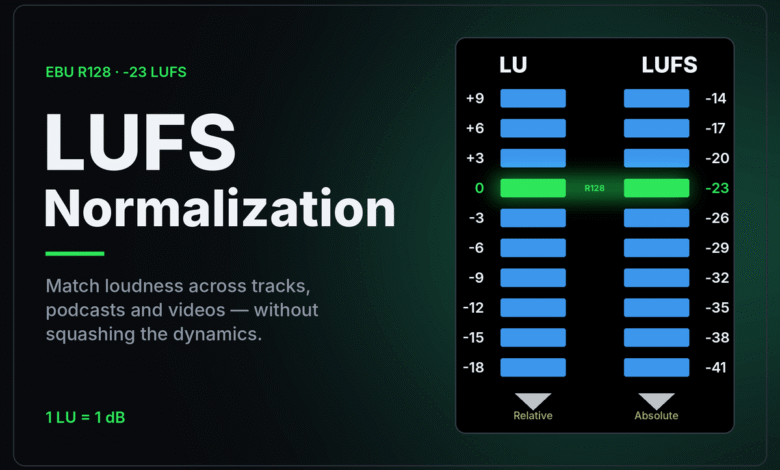
What is LUFS normalization? It is how streaming platforms play different tracks at a similar loudness. The platform measures your track’s integrated loudness in LUFS (Loudness Units relative to Full Scale), compares it with a reference level, and turns playback up or down to match. Your file is not rewritten; only the playback level moves. If your master is louder than the reference, it gets turned down, which is why a track can sound quieter after upload than it did in your DAW. Spotify, for example, states a default reference of -14 LUFS.
Streaming services change their settings and documentation from time to time, so confirm the current figures on each service’s own help pages before you finalize a master.
What is LUFS normalization measuring? The LUFS scale explained
LUFS is a unit of loudness, not of electrical level. It comes from the International Telecommunication Union’s Recommendation ITU-R BS.1770, titled “Algorithms to measure audio programme loudness and true-peak audio level.” The ITU’s page lists BS.1770-5 from November 2023 as the version in force.
The key idea is that a loudness measurement tries to track how loud audio sounds to a listener, rather than how high its peaks go. Two tracks can peak at exactly the same level and still sound very different in loudness, because one spends most of its time near the peak and the other does not. A peak meter cannot see that difference. A LUFS meter is designed to.
A few terms come up constantly:
| Term | What it means | Why it matters for uploads |
|---|---|---|
| LUFS | Loudness measured on the BS.1770 scale | The number platforms compare against their reference |
| LKFS | Another name for the same scale, common in broadcast | You may see it in video and TV specifications |
| Integrated loudness | One loudness figure for the whole track | The value normalization is based on |
| True peak (dBTP) | The highest level of the signal, including peaks between samples | Platforms and encoders need headroom above it |
Spotify’s own page describes its reference in terms of “integrated LUFS” and its peak advice in terms of true peak, which is why those two readings are the ones to watch.
How LUFS normalization works on a streaming platform
The process is simple once you see it in steps.
- The platform measures your track. It calculates the integrated loudness of the file you delivered.
- It compares that figure with its reference level. Spotify’s loudness normalization page for artists states, “We adjust tracks to -14 dB LUFS, according to the ITU 1770 standard.”
- It applies a playback gain offset. Spotify says “Negative gain is applied to louder masters,” while “Positive gain is applied to softer masters so the loudness level is -14 dB LUFS.”
- It respects headroom when turning up. For quiet tracks, Spotify adds: “We consider the headroom of the track, and leave 1 dB headroom for lossy encodings to preserve audio quality.” A quiet master with high peaks may therefore not be raised all the way.
As a worked example: a master that measures -8 LUFS integrated, played on a service with a -14 LUFS reference, is turned down by about 6 dB. A master that measures -14 LUFS is played as it is.
Spotify also normalizes albums as a unit when you play them in order. Its page says “We normalize an entire album at the same time,” so the level differences between songs on the album are kept, but individual tracks are adjusted “when shuffling an album or listening to tracks from multiple albums.”
Why does my track get quieter after I upload it?
This is the question that sends most people looking up LUFS in the first place. The usual reasons:
| What you notice | Likely reason | What to check |
|---|---|---|
| The track is quieter on the platform than in your DAW | Your master is louder than the platform’s reference, so it is turned down | The integrated LUFS of your master |
| Your loud master sounds smaller than a quieter-looking reference track | At matched loudness, heavy limiting no longer buys extra volume, only fewer transients | Compare both tracks at matched loudness |
| The track sounds quieter than others even though it measures low | Its peaks leave too little headroom to raise it fully | True peak level of your master |
| Levels change between album and shuffle listening | Album and track normalization behave differently | Which mode you were listening in |
| Everything on the app sounds quieter, not just your track | The listener’s own level setting | The app’s volume level setting, such as Spotify’s Quiet option |
The second row is the one that surprises producers. Before normalization, pushing a master louder made it stand out next to other tracks. Once every track is played at a similar loudness, that advantage is gone. What remains is the cost: a heavily limited master has had its peaks flattened, while a more dynamic track at the same loudness keeps its punch.
If the whole playback chain is quiet, the problem may be the device rather than the track. The guide to high-impedance headphones that are quiet on a phone covers that case.
Which reference levels are actually published
Online tables often list a confident LUFS target for every streaming service. Be careful with them. Only some services publish their figures, and third-party guides do not always agree with each other about the rest. This table sticks to what official sources state.
| Platform or standard | Published figure | Source, read 2026-09-25 |
|---|---|---|
| Spotify, default (Normal) | -14 LUFS | Spotify loudness normalization page for artists |
| Spotify, Loud and Quiet settings | -11 LUFS and -19 LUFS | Same page |
| Apple Music, Sound Check | No LUFS figure given | Apple Support, “If music in Apple Music sounds quiet” |
| European broadcast, EBU R 128 | -23 LUFS | EBU R 128 page, version 5.0, November 2023 |
On Apple Music, Apple’s support article, published March 26, 2025, says “Sound Check adjusts the loudness between different songs to play at the same volume,” and explains how listeners switch it on or off, but gives no target number. Figures quoted elsewhere for Apple Music come from third parties, not from Apple’s help page.
On Spotify, Premium listeners can choose between those Loud, Normal and Quiet levels in the app settings. On Loud, Spotify says it applies a limiter to “prevent distortion and clipping in soft dynamic tracks.” That is the one case on that page where the platform does more than change the playback level.
The EBU figure is for broadcast, not music streaming. The EBU R 128 page describes “an average programme loudness of -23 LUFS” for program material. It shows that the same measurement scale is used with very different reference levels depending on the medium. The same principle keeps TV programs and ads at consistent levels, though a TV can still have dialogue that is too quiet for reasons unrelated to loudness normalization.
What to do about it when mastering
Normalization changes what “loud enough” means. A practical approach:
- Measure with a BS.1770-based loudness meter. Many DAWs include one. Read the integrated value for the whole track, and the true peak.
- Do not chase a number for its own sake. Spotify’s page does say “Target the loudness level of your master at -14dB integrated LUFS,” but a master louder or quieter than that still plays; it is simply turned down or up. Master for the music first.
- Watch true peak. Spotify advises keeping masters “below -1dB TP (True Peak) max,” and says “If your master is louder than -14dB integrated LUFS, keep True Peak below -2dB.”
- Compare at matched loudness. When checking your master against reference tracks, match their loudness first. Otherwise the louder track can seem better simply because it is louder.
- Remember other destinations. Files played outside a normalizing app, such as downloads in a basic player, play at whatever level they were mastered. A master can reasonably serve streaming and downloads at the same time.
If your problem is a recording that is too quiet before mastering, that is a gain-staging issue rather than normalization. The guide to a mic that is too quiet at max gain covers where recording level gets lost.
What LUFS normalization does not do
Normalization is often described as more powerful than it is.
It does not remix or re-master your track. Changing the playback gain moves the whole track up or down by the same amount. The balance inside your mix stays as you delivered it. The exception on Spotify is the limiter on the Loud setting described above.
It does not make every song sound equally loud to every listener. BS.1770 is a standardized model of perceived loudness. It is far closer to what people hear than a peak meter, but it is still a model, and loudness perception varies between genres, playback systems and listening levels.
It does not apply to every listener. Apple’s support article shows how to turn Sound Check off, and Spotify’s Premium listeners can choose a different level. Your track will reach some people at a different level than the default.
It does not fix a quiet master with high peaks. Because Spotify considers a track’s headroom before raising it, a quiet master with loud peaks may stay below the reference.
FAQ
What LUFS should I master to for streaming?
There is no single correct value. Spotify’s page suggests targeting -14 LUFS integrated with true peak below -1 dBTP, and says louder masters should keep true peak below -2 dBTP. Other services do not all publish figures. A master at any sensible loudness still plays; it is simply adjusted.
Is LUFS the same as dB?
Not exactly. dBFS on a peak meter shows how close the signal gets to the maximum digital level. LUFS measures loudness over time using the method in ITU-R BS.1770. A track can peak near the maximum and still measure quite low in LUFS.
Does loudness normalization make my track sound worse?
Turning a track down does not change its sound, only its level. On Spotify, the Loud setting adds a limiter for soft dynamic tracks. A heavily limited master may sound less punchy than dynamic tracks once both play at a similar loudness, but that comes from the master, not from normalization.
Why does my song sound quieter than other songs on Spotify?
Either it was mastered louder and turned down, and now sounds flatter than more dynamic tracks at the same loudness, or it measures below the reference and its peaks leave too little headroom to raise it fully. Check the integrated LUFS and true peak of your master.


