Reaper is a digital audio workstation (DAW) that has been gaining popularity among music producers, sound designers, and audio engineers. It offers a wide range of features and flexibility at an affordable price, making it an attractive option for those who are looking for a powerful DAW without breaking the bank. But how good is Reaper? Is it worth the hype?
First and foremost, Reaper is known for its customization options. Users can customize almost every aspect of the software, from the layout to the shortcuts, to suit their workflow. This level of flexibility is not common in other DAWs, and it can greatly increase productivity and efficiency. Additionally, Reaper supports a wide range of audio formats and plugins, making it a versatile tool for any project.
Another advantage of Reaper is its low CPU usage. This means that users can run more plugins and effects without experiencing any lag or crashes. It also makes it easier to work with larger projects without the need for expensive hardware. However, it is worth noting that Reaper has a steeper learning curve compared to other DAWs, and its interface may not be as visually appealing. Reaper is a solid choice for anyone looking for a powerful and customizable DAW at an affordable price.
Understanding Reaper
Reaper as a DAW
Reaper is a Digital Audio Workstation (DAW) that is widely used by musicians, podcasters, and audio engineers. It is a powerful tool that allows users to record, edit, mix, and master audio files. One of the key features of Reaper is its flexibility, which allows users to customize the software to suit their specific needs. This makes it a great choice for both beginners and experienced users.
The Interface of Reaper
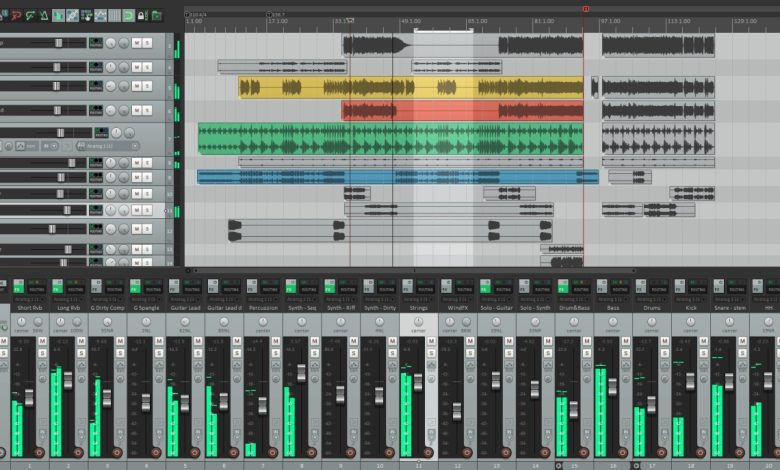
The interface of Reaper is designed to be user-friendly and intuitive. The layout is clean and easy to navigate, with all of the essential tools and features easily accessible. Users can customize the interface to suit their preferences, with the ability to add or remove various elements of the interface. This makes it easy to work with Reaper, regardless of your level of experience.
Workflow in Reaper
Reaper’s workflow is designed to be efficient and streamlined. The software is optimized to work with a wide range of audio file formats, and it can handle large projects with ease. Users can work with multiple tracks simultaneously, and Reaper’s powerful editing tools make it easy to make precise edits to your audio files. The software also includes a range of automation tools, which can help to speed up your workflow and make your work more efficient.
Reaper is a powerful and flexible DAW that is well-suited for a wide range of audio projects. Its user-friendly interface and efficient workflow make it a great choice for both beginners and experienced users. Whether you are recording music, editing podcasts, or working on other audio projects, Reaper is a tool that can help you achieve your goals.
Technical Aspects
System Requirements
Before you download and install Reaper, it’s important to make sure your system meets the minimum requirements. According to the official Cockos website, Reaper is compatible with Windows, macOS, and Linux operating systems. Additionally, to run Reaper, you’ll need a 64-bit processor and at least 4GB of RAM.
Stability and Performance
Reaper is known for its stability and performance. It’s a lightweight and efficient digital audio workstation that can handle a large number of tracks and plugins without slowing down. Reaper’s performance is also optimized for low-latency audio processing, making it an ideal choice for recording and mixing in real-time.
RAM and Memory Usage
Reaper is designed to be resource-efficient, which means it doesn’t require a lot of RAM or memory to run smoothly. In fact, Reaper’s memory usage is significantly lower than other popular DAWs like Pro Tools and Logic Pro X. This is partly due to Reaper’s ability to unload unused plugins and data from memory, freeing up resources for other tasks.
Reaper is a reliable and efficient digital audio workstation that can handle complex audio projects with ease. Its low system requirements, stability, and optimized performance make it a great choice for musicians, producers, and audio engineers of all levels.
Recording and Mixing with Reaper
Audio and MIDI Recording
Reaper is a versatile digital audio workstation that allows you to import any audio and MIDI, synthesize, sample, compose, arrange, edit, mix, and master songs or any other audio projects. With Reaper, you can record audio and MIDI tracks with ease. The software supports a wide range of recording gear, so you can use your favorite microphone or audio interface to capture your sound.
Reaper also offers a range of tools to help you edit your audio and MIDI tracks. You can use the built-in notation editor to create and edit sheet music, or use the MIDI editor to fine-tune your MIDI tracks. The software also includes a range of effects and plugins to help you shape your sound.
Mixing and Mastering
Reaper’s mixing and mastering capabilities are second to none. The software includes a full mixing console that allows you to adjust levels, pan, and EQ your audio tracks. Reaper also supports track grouping and routing, which makes it easy to apply effects and plugins to multiple tracks at once.
The software also includes a range of mastering tools to help you finalize your mix. You can use the built-in compressor and limiter to control the dynamics of your mix, or use the built-in EQ to shape your sound. Reaper also supports third-party plugins, so you can use your favorite mastering tools to achieve the perfect sound.
Track Grouping and Routing
Reaper’s track grouping and routing capabilities are a standout feature. With Reaper, you can group tracks together and apply effects and plugins to the group as a whole. This makes it easy to apply the same effects and plugins to multiple tracks at once, which can save you a lot of time.
Reaper also supports flexible routing options, which allows you to route audio between tracks in any way you want. This makes it easy to create complex routing setups, which can be useful for advanced mixing and mastering techniques.
Reaper is an excellent choice for recording, mixing, and mastering music. The software offers a wide range of features and tools that are designed to help you achieve the perfect sound. Whether you’re a professional musician or a hobbyist, Reaper is a great choice for all your audio needs.
Reaper’s Support for Plugins and Effects
Reaper is known for its excellent support for plugins and effects. Whether you’re using built-in plugins or third-party plugins, Reaper makes it easy to add and use them in your projects.
Built-In Plugins
Reaper comes with a variety of built-in plugins, including EQ, compression, reverb, and delay. These plugins are high-quality and easy to use, making them a great choice for beginners and professionals alike.
One of the standout features of Reaper’s built-in plugins is their flexibility. For example, the EQ plugin allows you to choose between different filter types, adjust the frequency range, and even switch between stereo and mid-side modes. This level of control is essential for getting the perfect sound in your mix.
Third-Party Plugins
In addition to its built-in plugins, Reaper also supports a wide range of third-party plugins. This means you can use your favorite plugins from other companies, such as Waves, FabFilter, and iZotope, directly within Reaper.
Reaper’s support for third-party plugins is excellent, with no issues reported with most plugins. The process of adding third-party plugins is straightforward, and once added, they work seamlessly with Reaper’s interface.
Reaper’s support for plugins and effects is one of its strongest features. Whether you’re using built-in plugins or third-party plugins, you’ll find that Reaper makes it easy to add and use them in your projects.
Learning and Using Reaper
If you’re new to Reaper, you might find the interface to be a bit overwhelming at first. However, with a bit of patience and practice, you’ll soon find that Reaper is a powerful and flexible DAW that can handle just about any task you throw at it.
Learning Curve
While Reaper may have a steeper learning curve than some other DAWs, it’s important to remember that this is largely due to the sheer amount of features and customization options available. Once you get the hang of the basics, you’ll find that Reaper is incredibly intuitive and easy to use.
One of the best things about Reaper is its dedicated community of users. There are countless tutorials, forums, and YouTube channels dedicated to helping new users get started with the software. Whether you’re looking for a step-by-step guide to setting up your first project or just need some help with a specific feature, there’s no shortage of resources available.
Help and Documentation
Reaper also comes with extensive documentation built right into the software. Everything from the user manual to the keyboard shortcut list is just a click away, making it easy to find the information you need when you need it.
In addition to the built-in documentation, Reaper also has a robust help system that can be accessed directly from the software. Whether you’re looking for help with a specific feature or just need some general guidance, the help system is a great place to start.
While Reaper may take some time to learn, the rewards are well worth the effort. With its powerful features, flexible customization options, and dedicated community of users, Reaper is a top-notch DAW that’s well worth considering for your next project.
Comparing Reaper to Other DAWs
When it comes to choosing a DAW, there are many options available in the market. Each DAW has its own unique features and capabilities. In this section, we will compare Reaper to some of the most popular DAWs in the market.
Reaper vs Logic Pro
Logic Pro is a popular DAW among Mac users. It is known for its intuitive interface and powerful features. However, when it comes to pricing, Logic Pro is significantly more expensive than Reaper. While Logic Pro costs around $200, Reaper costs only $60. Reaper also has a free fully-functional 60-day trial, which allows users to test it out before committing to a purchase. In terms of functionality, Reaper is just as capable as Logic Pro, if not more.
Reaper vs Ableton
Ableton is another popular DAW that is widely used in the electronic music production industry. It is known for its unique session view and real-time performance capabilities. Reaper, on the other hand, is more of a traditional DAW, with a timeline-based interface. However, Reaper is just as capable as Ableton when it comes to audio recording, editing, and mixing. Reaper also has a more affordable pricing model than Ableton.
Reaper vs Cubase
Cubase is a popular DAW among professional musicians and producers. It is known for its advanced MIDI capabilities and virtual instrument library. Reaper, on the other hand, is more of a no-frills DAW, with a focus on functionality. While Cubase may have more advanced MIDI features, Reaper is just as capable when it comes to audio recording, editing, and mixing. Reaper is also significantly more affordable than Cubase.
Reaper vs FL Studio
FL Studio is a popular DAW among electronic music producers. It is known for its intuitive interface and powerful capabilities. Reaper, on the other hand, is more of a traditional DAW, with a focus on functionality. While FL Studio may have more advanced features for electronic music production, Reaper is just as capable when it comes to audio recording, editing, and mixing. Reaper is also significantly more affordable than FL Studio.
Reaper vs Studio One
Studio One is a popular DAW developed by PreSonus. It is known for its intuitive interface and powerful features. However, when it comes to pricing, Studio One is significantly more expensive than Reaper. While Studio One costs around $400, Reaper costs only $60. Reaper also has a free fully-functional 60-day trial, which allows users to test it out before committing to a purchase. In terms of functionality, Reaper is just as capable as Studio One, if not more.
Pricing and Licenses
If you’re looking for a powerful Digital Audio Workstation (DAW) that won’t break the bank, then Reaper is definitely worth checking out. With a one-time fee of just $60 for a discounted license, Reaper is one of the most affordable DAWs on the market.
Trial Period
Reaper offers a 60-day evaluation period, which is a great way to test out all the features and see if it’s the right fit for your needs. During this time, you can use the software without any restrictions, and if you decide to purchase a license, all your settings and projects will be saved.
Commercial License
If you decide to purchase a license, there are two options available: the discounted license for $60 and the commercial license for $225. The discounted license is for individuals who use Reaper for personal use only, while the commercial license is for businesses and organizations.
With a commercial license, you can use Reaper for commercial purposes, and you’ll also receive free updates for the lifetime of the software. Additionally, you can install Reaper on multiple computers as long as you’re the only one using it.
Reaper’s pricing and licensing options make it an affordable and accessible DAW for musicians, producers, and audio engineers of all levels. Whether you’re a hobbyist or a professional, Reaper offers a powerful set of features and tools that can help you create high-quality audio projects.
Customizing Reaper
Reaper is known for its high level of customizability, allowing users to tailor the DAW to their specific needs and preferences. Here are some ways to customize Reaper:
Layouts and Themes
Reaper allows users to create their own layouts and themes, or download pre-made ones from the internet. Custom layouts can be created by dragging and dropping windows and toolbars to different locations, while themes can change the color scheme, icons, and fonts used in the DAW.
One popular theme is Pro Tools 12.5, which mimics the look and feel of Pro Tools. Another is Smooth 6 V2, which has a sleek, modern design. Users can also create their own themes using the Theme Development Kit provided by Reaper.
Actions and Tabs
Reaper also allows users to customize the actions and tabs in the DAW. Actions are keyboard shortcuts or mouse clicks that perform specific functions, while tabs are the different sections of the Reaper interface, such as the mixer, arrange view, and media explorer.
Users can customize actions by assigning their own keyboard shortcuts or creating macros that perform multiple actions at once. Tabs can be customized by adding or removing sections, changing the size and position of windows, and creating custom layouts.
The customizability of Reaper is one of its greatest strengths, allowing users to create a workflow that suits their needs and preferences. Whether it’s creating custom layouts and themes or customizing actions and tabs, Reaper provides a high level of flexibility and control.
Conclusion
Reaper is a powerful digital audio workstation (DAW) that offers a wide range of features and flexibility for audio professionals. While it may not have the same visual appeal and ease of use as other DAWs, Reaper more than makes up for it with its comprehensive tool kit.
One of the biggest advantages of Reaper is its reasonable pricing. With a one-time cost of $60 for a personal license, Reaper is an affordable option for those looking for a high-quality DAW without breaking the bank. Additionally, Reaper offers a free trial period, allowing users to test out the software before committing to a purchase.
Reaper’s features and capabilities are also noteworthy. It offers support for a wide range of audio formats, including MIDI, WAV, MP3, and more. Reaper also includes built-in effects and plugins, as well as support for third-party plugins, making it a versatile choice for audio production.
Reaper is a solid option for those looking for a powerful and affordable DAW. While it may not be as visually appealing as other options, its comprehensive tool kit and flexibility make it a popular choice among audio professionals.