

Audacity is a free, open-source, multi-track audio editor and recorder software that has been around since 2000. It is widely used by podcasters, musicians, and other audio enthusiasts for recording, editing, mixing, and mastering audio on their computers. However, one question that often arises is whether Audacity is considered a Digital Audio Workstation (DAW).
A DAW is a software application used for recording, editing, and producing audio files. It is an essential tool for musicians, producers, and audio engineers. While Audacity has many features that are similar to a DAW, such as multi-track recording and editing, it lacks some of the advanced features that professional DAWs offer. Nonetheless, Audacity is a powerful tool that can be used for a variety of audio projects.
Understanding Audacity
Audacity is a free, open-source digital audio workstation (DAW) that has been around since the year 2000. It is available for Windows, Mac, and Linux operating systems. Audacity is a powerful audio editing tool that can record, edit, and mix audio tracks with ease.
One of the best things about Audacity is that it is free to use, and it does not require any registration or hardware purchase. Audacity is also very easy to use, making it a great choice for beginners who are just starting with audio editing.
Audacity supports a wide range of audio formats, including WAV, AIFF, MP3, and Ogg Vorbis. It also has a lot of built-in effects and plugins, such as EQ, compression, and reverb. Audacity also allows you to use third-party plugins to extend its functionality even further.
Another great feature of Audacity is its ability to record audio from different sources, such as microphones, line-in inputs, and even streaming audio from the internet. Audacity also supports multi-track recording, which allows you to record and mix multiple audio tracks at the same time.
Audacity is an excellent choice for anyone who needs a powerful, yet easy-to-use audio editing tool. Whether you are a professional audio engineer or a beginner, Audacity has everything you need to create high-quality audio recordings and mixes.
Is Audacity a DAW?
Audacity is a free, open-source audio editing software that has been around since 2000. It is a popular choice for many musicians, podcasters, and other audio enthusiasts. However, the question remains: is Audacity considered a DAW?
The short answer is no. Audacity is not a full-fledged digital audio workstation (DAW). While it does have some basic multitrack recording and editing capabilities, it lacks many of the features that are typically associated with DAWs.
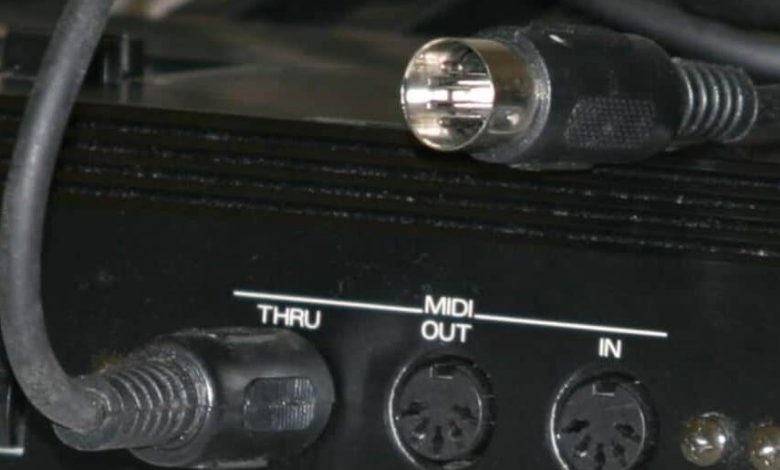
For example, Audacity does not have built-in virtual instruments or MIDI sequencing capabilities. It also lacks advanced mixing and automation features. While you can certainly use Audacity to record and edit multiple tracks, it is not designed to be a fully-featured music production tool.
That being said, Audacity is still a powerful and versatile tool for audio editing and processing. Its simple interface and intuitive controls make it a great choice for beginners and those who only need basic editing capabilities. And, of course, the fact that it is free and open-source is a huge selling point for many users.
while Audacity is not a DAW in the traditional sense, it is still a valuable tool for anyone who needs to edit and process audio files. If you are looking for a more advanced music production tool, however, you may want to consider investing in a full-fledged DAW like Ableton Live, Logic Pro, or Pro Tools.
Features of Audacity as a DAW
Audacity is a free and open-source software that has been used by many musicians and audio professionals for years. With the latest update to version 3.2, Audacity is now considered a full-fledged digital audio workstation (DAW). Here are some of the key features that make Audacity a great option for those looking for a free DAW:
Recording
Audacity can record live audio through a microphone or mixer, or digitize recordings from other media. It supports recording up to 32-bit depth and 192 kHz sample rate, which is more than enough for most home studio recordings. There are also various recording options available, such as overdubbing and punch-in/out recording.
Editing
Audacity provides a wide range of editing tools that allow users to manipulate audio with ease. You can cut, copy, paste, and delete audio segments, as well as adjust the volume, pitch, and tempo of the audio. There are also various effects and filters available, such as EQ, compression, and reverb, that can be applied to the audio to enhance its quality.
Mixing
Audacity allows users to mix multiple tracks together to create a final mix. You can adjust the volume, pan, and balance of each track, and add various effects and filters to each track to create a unique sound. There is also a mixer board available that allows you to adjust the levels of each track in real-time.
Exporting
Audacity supports exporting audio in many different file formats, including WAV, AIFF, MP3, and FLAC. You can also export multiple files at once, which is great for creating stems for a final mix. The software also provides various export options, such as adjusting the bit depth, sample rate, and metadata of the exported audio.
Audacity is a great option for those looking for a free DAW. It provides all the basic features needed for recording, editing, mixing, and exporting audio, and is easy to use for beginners. While it may not have all the advanced features of paid DAWs, it is still a great tool for home studio recordings and simple audio projects.
Comparison with Other DAWs
When it comes to digital audio workstations (DAWs), Audacity is often compared to other popular options like Ableton Live, Logic Pro, and Pro Tools. While Audacity is a powerful audio editor and recorder, it lacks some of the more advanced features found in these other DAWs.
One major difference between Audacity and other DAWs is the lack of support for MIDI. This means that Audacity cannot be used to create or edit MIDI tracks, which are commonly used in electronic music production. Additionally, Audacity does not have built-in virtual instruments or effects, which limits its capabilities when it comes to creating complex arrangements.
Another area where Audacity falls short compared to other DAWs is in its mixing capabilities. While Audacity does support multi-track recording, it is not designed to handle large-scale mixing projects with dozens of tracks and complex routing. Other DAWs like Pro Tools and Logic Pro are better suited for these types of projects.
That being said, Audacity does have some advantages over other DAWs. It is free and open source, which makes it accessible to anyone regardless of their budget. Additionally, Audacity is known for its ease of use and intuitive interface, which makes it a great choice for beginners or those who are new to audio production.
while Audacity is a powerful audio editor and recorder, it falls short compared to other DAWs when it comes to advanced features like MIDI support and complex mixing capabilities. However, its accessibility and ease of use make it a great choice for those who are just getting started with audio production.
User Reviews
Audacity is a popular audio recording and editing software that has been used by many users for a variety of purposes. Here are some user reviews that shed light on the software’s capabilities:
-
According to a user on TrustRadius, Audacity is a “dead-simple package” that offers “basic sound editing and recording” capabilities. They rated it 9 out of 10 for “Value, Ease of Use, and Efficiency for Podcasts.”
-
Another user on Software Advice praised Audacity’s wide range of capabilities and ease of use. They rated it 4.5 out of 5 for “Ease-of-use,” “Customer Support,” “Value for money,” and “Functionality.”
-
A Reddit user shared their experience of using Audacity for multi-tracking and found it to be useful for quickly editing music mp3’s.
users seem to appreciate Audacity for its simplicity, versatility, and affordability. However, some users have noted that it may not be as powerful as other digital audio workstations (DAWs) available in the market.
Conclusion
Audacity is a versatile audio editing software that offers many features that are commonly found in digital audio workstations (DAWs). While it may not have all the advanced features of a professional DAW, it can still be a great tool for beginners or those on a budget.
One of the benefits of Audacity is that it is free and open-source, which means that anyone can download and use it without having to pay any licensing fees. Additionally, it is available on both Mac and Windows operating systems.
Audacity offers a range of features that make it a great choice for basic audio editing and recording tasks. It can handle multiple tracks, apply effects, and export files in a variety of formats. It also supports plugins, which can extend its functionality even further.
However, there are some limitations to Audacity. It may not be the best choice for professional audio engineers or musicians who require more advanced features like automation, surround sound mixing, and video synchronization. Additionally, it may not be as stable or reliable as some of the more established DAWs on the market.
Audacity can be a great option for those who are just starting out in audio editing or who are looking for a free alternative to more expensive DAWs. While it may not have all the bells and whistles of a professional DAW, it can still be a powerful tool for creating and editing audio.


