

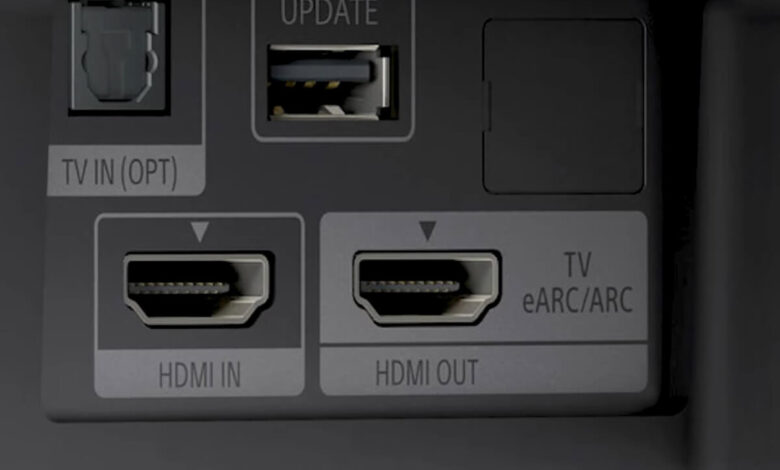
If you are trying to decide between an optical cable and HDMI ARC rather than between ARC and eARC, read Optical Audio vs HDMI ARC instead, since that is a different question with a different answer. This article compares ARC to its newer sibling, eARC.
The short answer: if you only watch through streaming apps such as Netflix, Disney+, Prime Video, or a smart TV's built-in apps, standard ARC already carries the Dolby Atmos you are getting, and eARC changes nothing for you. If you play 4K Blu-ray discs, run Apple TV in its lossless audio mode, or stream Dolby Atmos music, ARC cannot carry that audio at all, and eARC is the only connection that will.
The short answer, by what you actually watch
Most guides to this topic start with a spec sheet. That is backward. The connection you need depends entirely on where your audio comes from, not on which cable looks newer or which port your TV happens to have.
| Your setup | What audio you are actually getting | Do you need eARC? |
|---|---|---|
| Streaming apps only (Netflix, Disney+, Prime Video, most smart TV apps) | Dolby Atmos delivered inside Dolby Digital Plus, a compressed but genuinely immersive format | No. Standard ARC already carries this. |
| 4K Blu-ray player, Apple TV in lossless mode, Atmos music services | Dolby TrueHD or another lossless, uncompressed format | Yes. ARC cannot carry these at all. |
If you fall in the first row, and most people asking this question do, you can stop reading the marketing copy on cable listings. Nothing about your Atmos experience changes when you add eARC, because the source itself never sends you anything eARC is needed for.
What ARC carries, and what it does not
ARC (Audio Return Channel) let a TV send audio back down the same HDMI cable used for video, so a soundbar or receiver could get sound from the TV's built-in apps without a separate cable. It is a compressed-audio connection: per the HDMI specification, ARC supports roughly 1 Mbps of audio bandwidth, an approximate figure rather than a fixed measured number.
That is enough for Dolby Digital, DTS, and Dolby Digital Plus, which includes lossy Dolby Atmos tunneled inside its stream. It is not enough for Dolby TrueHD, DTS-HD Master Audio, DTS:X, or uncompressed multichannel PCM beyond 5.1. Send the TV a source with one of those formats and ARC has no way to pass it through intact.
The setting that decides what actually leaves your TV on any given source is covered in more depth in Bitstream vs PCM, since the wrong setting can throw away Atmos even on gear that fully supports it.
What eARC adds
eARC (Enhanced Audio Return Channel) arrived with the HDMI 2.1 specification and uses a dedicated data channel rather than sharing the video path's leftover bandwidth. Per that specification, eARC supports roughly 37 Mbps, an order of magnitude more than ARC, again stated as approximate rather than measured. The HDMI 2.1 specification also lists support for up to 32 audio channels over eARC.
That extra headroom is what makes lossless formats possible: Dolby TrueHD (including Atmos mapped onto TrueHD), DTS-HD Master Audio, DTS:X, and uncompressed PCM up to 7.1 channels all fit through eARC where they simply do not fit through ARC. The container that carries the compressed version of Atmos on both ARC and eARC is explained in What Is Dolby Digital Plus?, which is worth reading if you want to understand why "Atmos" on a streaming app and "Atmos" on a Blu-ray disc are not quite the same signal.
Cable certification matters here too, though less than most listings imply. The HDMI specification designates "Ultra High Speed" as the certified cable tier built for eARC's full bandwidth, so a cable carrying that certification is built to the standard eARC needs. Certification is about the cable meeting a bandwidth target, not about switching on a feature the TV or receiver lacks; an Ultra High Speed cable plugged into an ARC-only TV still only delivers ARC.
Streaming: why ARC is usually already enough
Streaming services encode their Atmos catalog as Dolby Digital Plus, a compressed format built to fit reliably through home internet connections. That format is exactly what ARC was designed to carry. When a streaming app's Atmos badge lights up on your soundbar over a standard ARC connection, you are hearing the same audio stream you would get over eARC, because the source never contained anything larger.
This is the fact every cable-vendor page on this topic skips, because it does not lead anywhere they can sell you. If your listening is Netflix, Disney+, Prime Video, YouTube, or a game console's streaming apps, an eARC upgrade will not change what reaches your speakers. The bottleneck, if there is one, is somewhere else in the chain, not in the ARC connection itself.
That does not make eARC a wasted feature in a mixed household. If the same TV also feeds a 4K Blu-ray player or a console playing a lossless soundtrack on other nights, eARC still matters for those sources. It simply is not doing anything extra during a streaming session specifically, which is the part every ranking page glosses over.
Discs and lossless: the case where eARC is the only option
The picture changes the moment the source is a physical disc or a lossless service. 4K Blu-ray discs commonly carry a Dolby TrueHD Atmos track rather than the compressed Dolby Digital Plus version, because a disc has no bandwidth constraint the way a streaming connection does. Apple TV's lossless audio mode and Atmos music tracks on services that support lossless playback behave the same way.
Feed one of those sources through an ARC-only connection and the full lossless track cannot pass. Depending on how the devices are configured, you may get a downmixed stereo signal, a lossy Dolby Digital Plus version, or no Atmos indicator at all, rather than the format the disc or app actually contains. eARC is not an upgrade in this case; it is the only connection capable of carrying what you already own.
eARC is a device feature, not a cable you can buy
This is the section a cable listing will not write, because it argues against the purchase it is trying to make. eARC is a capability built into the HDMI ports of a TV and a soundbar or receiver. Both ends of the connection have to support it. A cable cannot add eARC to a TV or receiver that was never built with it, no matter how the cable is marketed.
The cable's job is narrower than people assume: it has to be capable of the bandwidth eARC needs and physically sound, nothing more. If your current cable is intact and reasonably new, replacing it will not unlock eARC on hardware that does not have it. A new cable only helps in the much more ordinary case where the old one is damaged, loose, or genuinely too old to carry a reliable signal at all. Before buying anything, check the actual eARC support of the TV and the soundbar or receiver themselves, in their specification sheets or manuals, since that is where the real limit sits.
Mixed setups are common and worth naming directly. If your TV supports eARC but your soundbar or receiver only supports ARC, or the reverse, the connection runs at ARC's level regardless of which single device is more capable. Some current TVs from brands like Samsung, LG, and Sony support eARC, and many current soundbars and AV receivers do too, but plenty of mid-range and older models on both sides still ship with ARC only, as examples of the split rather than a recommendation either way. There is no way to tell from a device's release year or price tier alone; check the specification sheet for each device separately.
How to tell which one you have
Most TVs and receivers label the relevant HDMI port directly on the back panel, printed as "ARC" or "eARC" next to the port. If yours is unlabeled, the TV's audio output settings menu usually names the connection type, and the same is true of the receiver or soundbar's input settings.
On the TV side, the setting is typically found somewhere under a sound or audio-output menu, sometimes labeled directly as "eARC" and sometimes shown as a toggle next to the relevant HDMI port. On the soundbar or receiver side, eARC is often tied to one specific HDMI input rather than any HDMI-in port on the unit, so plugging the cable into the wrong port on a multi-port receiver can look identical to the device simply not supporting eARC, even when it does.
There is also a behavioral clue. If Netflix or another app's Atmos indicator appears and then quietly disappears, or your soundbar's display drops from "Dolby Atmos" to plain "Dolby Digital" without any message explaining why, that is a symptom of the connection silently falling back to a lower format somewhere in the chain, not a setting you accidentally changed. That specific failure pattern, and how to trace it, is covered in Dolby Atmos Not Working Through Your Soundbar.
For the full picture of every point in the signal path where audio can drop or degrade, from the source through the TV and cable to the soundbar or receiver, see the cluster hub at The TV Sound Chain.
Related reading
- Optical Audio vs HDMI ARC: choosing a cable type, not a generation
- The TV Sound Chain: every point in the signal path, mapped
- Bitstream vs PCM: the TV setting that decides what actually gets sent
- Dolby Atmos Not Working Through Your Soundbar: diagnosing the silent fallback
- What Is Dolby Digital Plus?: the format Atmos rides inside on both ARC and eARC
Frequently asked questions
Does eARC require a new HDMI cable?
Not necessarily. eARC requires an HDMI cable capable of its bandwidth and in good physical condition, but the feature itself lives in the TV and the soundbar or receiver, not in the cable. If your existing cable is undamaged, it may already be sufficient; the cable is rarely the actual limitation.
Can I plug an eARC soundbar into a TV that only has ARC?
Yes, eARC is backward compatible with ARC. The connection will work, but it drops to standard ARC's compressed-audio bandwidth, so you will not get eARC's lossless formats. One eARC-capable device on either end is not enough; both need to support it.
Will Netflix or Disney+ sound different once I have eARC?
For most streaming apps, no. They deliver Atmos inside Dolby Digital Plus, which standard ARC already carries in full. The audio you hear from those apps will not change when you move to an eARC connection.
Why did my soundbar's Atmos badge disappear without any warning?
This usually means some point in the connection, the TV port, the cable, or the receiver's port, does not support eARC, so the system quietly fell back to standard ARC or a lower format instead of showing an error. See Dolby Atmos Not Working Through Your Soundbar for the ordered checklist.
How do I find out if my TV and receiver actually support eARC?
Check the HDMI port labeling on the back of each device, the audio settings menu on the TV, and the input settings on the receiver or soundbar. If none of those confirm it, the manufacturer's published specification sheet or manual will list eARC support directly.


