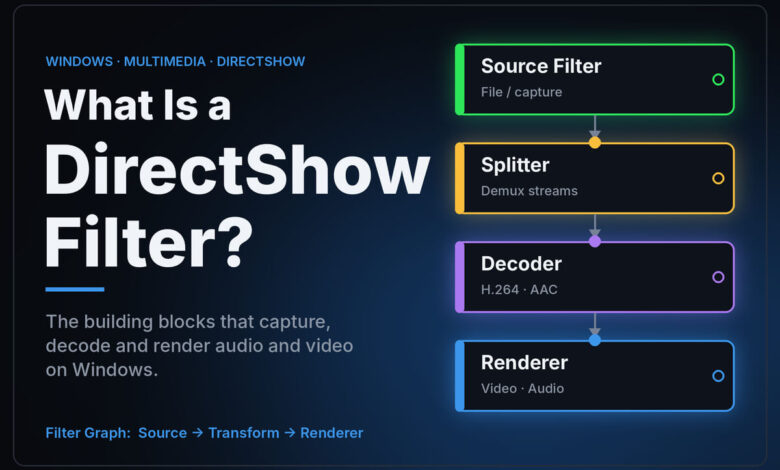
What is a DirectShow filter? It is one small software component inside DirectShow, Microsoft’s older media framework for Windows. Each filter does one job in a playback chain: read the file, split audio from video, decode a format, or send the result to your screen or sound card. Players that use DirectShow link several filters together to play a file. Microsoft now labels DirectShow a legacy feature, so a guide telling you to “install a filter” describes how Windows playback worked years ago, not how most modern apps work today.
Codec support in Windows changes between versions, so check the current pages before acting on any of it.
What is a DirectShow filter, in plain terms?
Think of playback as an assembly line. A video file arrives as a stream of raw bytes. Before you see and hear anything, several different jobs have to happen in order, and in DirectShow each of those jobs is done by a separate filter.
Microsoft’s own page, About DirectShow Filters on Microsoft Learn, walks through playing an AVI file as the example:
- A File Source filter reads the raw data from the file as a byte stream.
- An AVI Splitter filter reads the file’s headers and separates the video frames from the audio samples.
- A decoder filter, chosen according to the compression format, decodes the video.
- A Video Renderer filter draws the frames on the display.
- A Default DirectSound Device filter sends the audio samples to the sound card.
Microsoft describes each filter as a COM object, which is simply a standard Windows way of packaging a component so different programs can use it. The connection points between filters are called pins, and data moves from one filter to the next through them. The whole connected chain is called a filter graph.
The five kinds of filter you will see mentioned
Old forum threads and codec guides throw these terms around without explaining them. Microsoft’s documentation groups filters into broad categories, and knowing them makes those guides much easier to read.
| Filter type | What it does | Everyday example |
|---|---|---|
| Source | Brings data into the chain from a file, network, camera or other input | Opening a video file from disk |
| Splitter | Separates one input stream into several outputs, such as audio and video | Pulling the soundtrack out of a movie file |
| Transform | Takes a stream in, processes it, and passes a new stream out | An audio decoder turning Dolby Digital into plain channels |
| Renderer | Sits at the end and presents the result | Sending audio to your sound card or drawing video on screen |
| Mux | Combines several inputs into a single stream | Writing audio and video back into one file |
Microsoft notes that these categories are not absolute. Some filters do two jobs at once, and its own example is the ASF Reader, which acts as both a source and a splitter.
For audio, the filter that matters most is usually the transform filter that decodes a surround format. That is exactly where tools like the original AC3Filter sat: between the splitter and the audio renderer, deciding whether to decode Dolby Digital into ordinary channels or pass the untouched bitstream along to a receiver.
How Windows decides which filter to use
This is the part most old guides skip, and it explains a lot of the trouble people ran into.
When a DirectShow player opens a file, you rarely pick the filters yourself. A component called the Filter Graph Manager builds the chain automatically using a process Microsoft calls Intelligent Connect. According to Microsoft’s Intelligent Connect documentation on Microsoft Learn, when it needs a filter that can accept a given stream, it tries options in a fixed order: filters already cached, filters already in the graph, a preferred filter for that media type (from Windows 7 onward), and finally a search of the filters registered on the system.
That last step is ranked by merit, a number each filter carries to say how preferable it is compared with others. Filters with a merit at or below a value Microsoft names MERIT_DO_NOT_USE are ignored during that search.
Here is why that matters to you. A filter installed system-wide is registered for every DirectShow program on the PC, not just the one you installed it for. If two installed filters both claim they can decode the same audio format, the higher-merit one is tried first, whichever program is asking. That is how installing one bundle of codecs could quietly change the sound in a different player, or make a file that used to work suddenly go silent.
Why DirectShow filters feel outdated in 2026
Every DirectShow page on Microsoft Learn now opens with the same notice. It says DirectShow “is a legacy feature” that has been superseded by MediaPlayer, IMFMediaEngine and Audio/Video Capture in Media Foundation, and that Microsoft “strongly recommends” new code use those instead of DirectShow when possible.
In practical terms, that means three things for a listener or viewer:
- Newer apps generally do not depend on DirectShow filters. Software built on Microsoft’s newer frameworks uses different components, so a DirectShow filter you install may do nothing at all for them.
- Some players bring their own decoders. Players that ship with built-in decoding handle formats internally rather than relying on the system’s DirectShow filters. That is why a file can play with sound in one player and stay silent in another.
- DirectShow still exists. Microsoft calls it legacy, not removed. Older programs and some specialist tools still build filter graphs, so the concept has not vanished. It has moved from “how Windows plays things” to “how some older programs play things.”
The Windows 11 24H2 AC-3 change, and why it confuses people
A lot of people rediscover DirectShow filters because a movie suddenly plays with no sound. One common cause in recent years has nothing to do with filters at all.
Microsoft’s support page Codecs in Media Player states: “Beginning with Windows 11, version 24H2, the AC-3 codec is no longer included with Windows.” AC-3 is Dolby Digital, the surround format used on DVDs and many video files. The same page lists two exceptions: many device manufacturers pre-install an AC-3 codec, and a PC upgraded to 24H2 from an earlier version of Windows keeps the codec.
So two PCs running the same version of Windows can behave differently with the same file. One was a clean install, the other an upgrade or a manufacturer image. Old guides answer this with “install an AC3 filter,” but that advice predates the current setup and can send you to download sites of unknown origin.
Does an old “install this filter” guide still apply to you?
Use this as a quick decision table before following any older tutorial.
| Your situation | Does a DirectShow filter matter? | Sensible next step |
|---|---|---|
| A modern built-in Windows app plays video but no sound | Unlikely | Check the codec situation for your Windows version on Microsoft’s support page |
| A player with its own built-in decoders works fine, another player is silent | No for the working player | Use the player that decodes the format itself |
| An older program that you know uses DirectShow is silent on one format | Possibly | Look at which decoder that program is using before adding anything new |
| Sound plays but a receiver or soundbar shows stereo instead of surround | Usually not the filter | Check passthrough or bitstream settings on the player and output device |
| A guide asks you to install a large bundle of codecs from a mirror site | No, and it is a risk | Skip it and use a player with built-in decoding or an official extension instead |
The pattern is simple. In 2026, a missing filter is rarely the real problem, and adding more system-wide filters can create new problems because of the merit ranking described above.
Where DirectShow filters meet surround sound
AC3Filter, the tool this site takes its name from, was a DirectShow audio filter. It lived at the transform stage and decided what happened to a Dolby Digital or DTS track: decode it on the PC into separate channels, or send the untouched bitstream out through a digital output such as S/PDIF. If you want the background on that output, our explainer on what an S/PDIF output is covers the connection itself.
That same “decode here or pass it through” decision still exists today. It just lives in different places: player settings, streaming device menus and the audio output settings on TVs. If surround is not reaching your equipment, the question is usually where decoding happens, not which filter is installed. Our explainer on what a stereo receiver does covers what happens to a signal once it reaches the receiver, and if a soundbar goes quiet on a digital connection, the optical no-sound checklist walks through the settings to check in order.
What DirectShow filters cannot tell you
A filter graph explains how audio moves through a program. It does not tell you whether a file is damaged, whether your speakers support a format, or whether a streaming service is sending surround in the first place. Those are separate checks. If a service plays only in stereo on a setup that should handle more, that is usually a device or account setting, which our piece on Netflix not playing surround sound covers step by step.
It also does not make an old filter safe. A filter runs inside every program that loads it. Software that has not been maintained for years, installed system-wide, is a real risk, and having been useful once does not change that. The honest 2026 answer is that most listeners no longer need to install a DirectShow filter at all.
Frequently asked questions
Is a DirectShow filter the same as a codec?
Not exactly. A codec is the method for compressing and decompressing audio or video. A DirectShow filter is a software component, and a decoder filter is one way of delivering a codec to programs that use DirectShow. Other filters, such as splitters and renderers, are not codecs at all.
Do I need to install DirectShow filters on Windows 11?
Most people do not. Microsoft describes DirectShow as a legacy feature, many current apps use newer frameworks, and several popular players decode common formats themselves. Only older programs that rely on DirectShow might need a specific filter.
Why does one media player play sound when another does not?
The two players are probably using different decoders. One may carry its own built-in decoder for the audio format, while the other depends on what Windows provides. On a clean install of Windows 11 version 24H2, Microsoft says the AC-3 codec is no longer included, which can cause exactly this split.
What is filter merit?
Merit is a number each registered DirectShow filter carries to indicate how preferable it is. When Windows searches its registry for a filter that can handle a stream, it tries higher-merit filters first and ignores those at or below a threshold Microsoft calls MERIT_DO_NOT_USE.
Are codec packs safe to install?
Treat large bundles from mirror and download sites with caution. They install many system-wide filters at once, which can change behavior in unrelated programs, and some download sites bundle unwanted software. A player with built-in decoding, or an official extension, is usually the safer route.