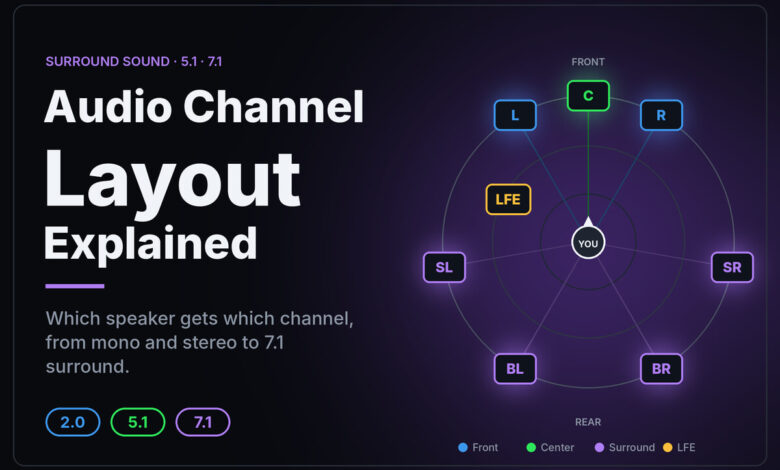
Here is the audio channel layout explained in one line: each number counts a different kind of speaker or channel. The first number is ear-level speakers, the number after the first dot is subwoofers or low-frequency effects channels, and a third number, when present, is height speakers. So 2.0 is plain stereo, 5.1 is five ear-level speakers plus one subwoofer, and 7.1.4 is seven ear-level speakers, one subwoofer and four overhead speakers. Having the content in a layout and having the speakers for it are two separate things.
Audio channel layout explained: the three numbers
Dolby’s own Dolby Atmos Speaker Setup 101 guide states the rule directly: “The first number tells you the number of standard ear-level speakers. This includes left, right, and center, as well as surround speakers. The second number, after the dot, indicates the number of subwoofers (special speakers for bass). The third number, if there is one, is the number of height speakers for Dolby Atmos.”
That gives you a simple way to read any label:
| Label | Ear-level | Subwoofer / LFE | Height | Total |
|---|---|---|---|---|
| 2.0 | 2 (left, right) | 0 | 0 | 2 |
| 2.1 | 2 | 1 | 0 | 3 |
| 5.1 | 5 (left, center, right, two surrounds) | 1 | 0 | 6 |
| 7.1 | 7 (adds two more surrounds) | 1 | 0 | 8 |
| 5.1.2 | 5 | 1 | 2 | 8 |
| 7.1.4 | 7 | 1 | 4 | 12 |
Add the numbers together and you get the total channel or speaker count. A 7.1.4 system has twelve positions to feed, and 5.1.2 has eight.
What the “.1” actually is
The middle number trips up more people than any other part of the label, because it means something slightly different depending on whether you are talking about a speaker system or a piece of content.
On a speaker system, it counts subwoofers. That is how Dolby’s guide phrases it, and it is why you also see labels such as 5.2 or 7.2 on receivers: two subwoofers.
In a movie soundtrack or file, the “.1” is one low-frequency effects channel, usually shortened to LFE. It carries only deep bass effects such as explosions and rumble. It is written as “.1” rather than “1” because it does not carry the full range of sound the other channels do. Much of the bass in a mix, such as a bass guitar or a deep voice, normally lives in the main channels. Your receiver or soundbar can redirect that bass to a subwoofer too, which is why a 5.1 soundtrack played on a 5.2 system still uses both subwoofers.
The practical takeaway: a subwoofer is not the same thing as the LFE channel, even though they usually end up in the same box.
How the channels are ordered inside a file
This is the part most explainers skip, and it is the reason dialogue sometimes comes out of the wrong speaker.
A multichannel audio stream is a stack of numbered channels. Something has to say which channel belongs to which speaker. On Windows, that job is done by a speaker-position mask, and Microsoft’s KSAUDIO_CHANNEL_CONFIG documentation shows the order. For a standard 5.1 surround stream, the six channels are arranged within each block of audio data in this order:
- Front left
- Front right
- Front center
- Low frequency (LFE)
- Side left
- Side right
Two details on that page are worth knowing:
- Windows defines two kinds of 5.1. One uses “back” left and right speakers, the other uses “side” left and right speakers. Microsoft’s page names the side version as the configuration for a 5.1-channel surround format. If the content and your settings disagree about which one they mean, the surround channels can play from an unexpected place.
- One old 7.1 layout is obsolete. Windows once defined a 7.1 that added two extra front speakers on either side of the center. Microsoft now labels that configuration obsolete and no longer supported. The 7.1 surround configuration it lists instead uses both side and back surrounds.
You never need to edit these values yourself. They explain, though, why a file with a missing or wrong channel label can send the center channel, which carries most dialogue, to a different speaker.
Where the height speakers go
The third number only appears with formats that support height, such as Dolby Atmos. Dolby’s setup guide says Atmos height speakers “are either installed in the ceiling of the listening space or are upward-firing speakers that bounce sound off the ceiling.”
In a 5.1.2 setup, there is one pair of height speakers. In 7.1.4, there are four: a front pair and a rear pair above the listening area. Dolby publishes separate diagrams for each common layout on its setup guide pages, including in-ceiling, upward-firing and mixed versions.
Height content also works differently. Atmos soundtracks can include sound “objects” that carry position information rather than a fixed speaker assignment, and your receiver or soundbar works out which of your actual speakers should play each one. That is why the same Atmos track can play on a 5.1.2 system and a 7.1.4 system. Each one renders it for the speakers it has.
Which layout do you actually have?
The question most people really have is “What does 7.1.4 mean, and do I have it?” Three separate things decide the answer, and all three have to agree.
| Link in the chain | What to check | What goes wrong |
|---|---|---|
| The content | The audio track details in the streaming app, disc menu or player info panel | The same film may be offered in different formats on different services or plans |
| The playback device | Its audio output setting (stereo, surround, auto, passthrough) | The device may convert everything to stereo before it leaves |
| The speakers or soundbar | The format shown on its display or in its app, and the physical speakers connected | A soundbar may accept a 7.1.4 signal and play it on fewer physical speakers |
The layout you hear is the smallest of the three. A 7.1.4 soundtrack on a device set to stereo plays in stereo. A 5.1 track on a 7.1.4 system is still 5.1 content, even if the receiver spreads it across more speakers.
If your streaming device keeps sending stereo, our guide to Fire Stick audio passthrough settings shows where the setting lives, and if a single service refuses to play surround, Netflix not playing surround sound walks through the plan, device and app checks.
Channels versus speakers: what a label will not tell you
A layout number describes positions, not quality. It says nothing about how good each speaker is, how the room behaves, or whether the speakers are placed where the format expects. Dolby’s guide says height speakers should fire down from the ceiling or bounce off it to the listening position, which is one reason a compact all-in-one bar and a full room of speakers can carry the same label and sound very different.
The label also does not tell you whether you need more channels. A lot of music is released in stereo, and plenty of film and TV audio is 5.1 or stereo rather than a height format. More speakers help only when the source has something to send them, or when your receiver’s upmixing mode is doing the spreading, which is a processing choice rather than extra information in the recording.
If you are building up from two speakers, our explainer on what a stereo receiver does covers the starting point. And if you are hearing “surround” on headphones, that is a different technology again: our spatial audio troubleshooting guide covers headphone spatial modes when they do not behave.
A quick glossary
- Channel: one independent stream of audio meant for one position.
- Ear-level speakers: left, center, right and surrounds, placed around the listener at roughly seated ear height.
- LFE: the low-frequency effects channel, the “.1” in a content label.
- Height speakers: in-ceiling or upward-firing speakers, the third number.
- Downmix: combining more channels into fewer, such as 5.1 into stereo.
- Upmix: a processor spreading fewer channels across more speakers.
Frequently asked questions
What does 7.1.4 mean in simple terms?
Seven speakers around you at ear level, one subwoofer, and four speakers above you. In total that is twelve positions. The ear-level seven are left, center, right, and two pairs of surrounds, one at the sides and one behind.
Is 5.1 better than 2.1?
It is not a quality ranking. 5.1 has a center speaker and two surrounds that 2.1 lacks, so it can anchor dialogue in the middle and place effects around you. If the content is stereo, those extra speakers have nothing new to play unless an upmix mode fills them.
Is the “.1” a subwoofer?
On a speaker system, yes: Dolby’s guide counts it as subwoofers. In a soundtrack, the “.1” is a low-frequency effects channel. The subwoofer usually plays that channel plus any bass redirected from the main speakers.
Can I play 7.1.4 content on a 5.1 system?
Generally, yes. Atmos content is rendered for the speakers you have, and channel-based content can be downmixed. You will not hear height effects from dedicated overhead positions, but the soundtrack still plays.
Why does dialogue sometimes come from the wrong speaker?
Usually the channel layout was read incorrectly somewhere in the chain. The center channel carries most dialogue, and if a file or device labels channels wrongly, it can end up in a different speaker or get lost in a downmix.