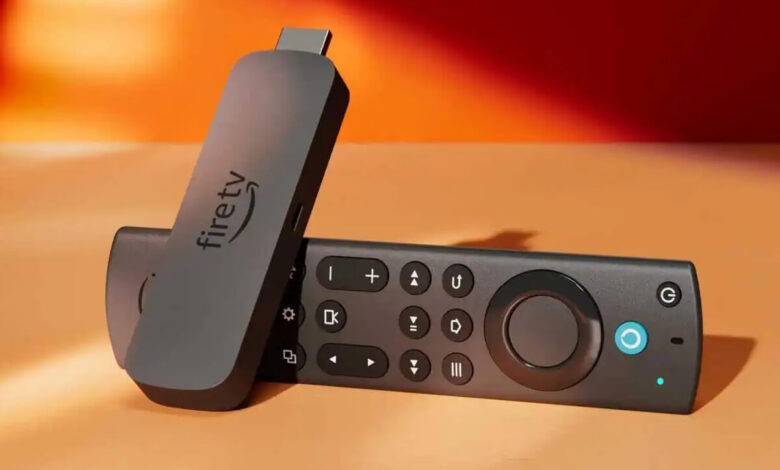
Passthrough tells the device not to decode. Instead of turning the soundtrack into plain audio samples itself, the stick or console sends the encoded surround stream onward untouched and lets the soundbar or receiver decode it. On a Fire TV device the control sits in the audio section of the settings as a Dolby output option. On a PlayStation console it is the audio format and HDMI device type. Get it wrong in one direction and you lose surround. Get it wrong in the other and you lose sound entirely.
That asymmetry is the reason this setting causes so much confusion, and it is the thing to understand before touching any menu.
What passthrough is doing, in one paragraph
Every surround soundtrack arrives encoded. Something has to decode it. The only question this setting answers is which box does the decoding.
Set the source to decode, and it hands downstream equipment finished audio samples. Over an ordinary consumer connection that usually means a two channel result, so the surround information is gone before it leaves the device. Set the source to pass through, and the encoded stream travels intact to a bar or receiver that decodes it into discrete channels. That is the whole mechanism, and it is the same mechanism described in the comparison of bitstream and PCM output, which also covers the cases where decoding at the source is the better choice.
Where the Fire Stick audio passthrough settings live, and what they change
On Fire TV devices the audio controls sit under the display and sound settings, with a Dolby output option that decides whether Dolby formats are passed to the connected system. Menu wording moves between software versions, so treat the path as a description rather than a script; this reflects the platform as documented on September 8, 2026.
The more durable insight is in Amazon's own developer documentation, because it explains what the apps are doing. Amazon states that "by default, the speakers of Fire TV Edition support stereo output only, and hence apps can stream stereo content by default. Dolby passthrough however is supported and recommended when playback is on TV speakers," and that "when the TV is connected to a sound bar or AVR via Optical audio output or HDMI (based on the Dolby system settings set by the user on Fire TV Edition), an app can choose to stream surround sound in Dolby audio format" (Amazon Fire TV developer documentation, read September 8, 2026).
Read that second sentence closely. The app chooses what to stream based on the system setting. Amazon's guidance to developers is to check a platform level flag for external surround sound and stream stereo when it is not set. So when passthrough is off, the app is not sending surround that later gets folded down. It never requests surround at all. That is why changing the sound mode on the soundbar does nothing: there is no surround arriving to unfold.
The three places a downmix can happen
Anyone chasing this problem is really asking where the channels disappeared. There are only three candidates, and they are worth testing in order.
At the app. The app decides what to request. If the platform reports that surround is not enabled, it streams stereo, and the title's audio menu will show no surround option.
At the device's audio output. This is the passthrough setting itself. Set to decode, the device produces a downmix. Set to pass through, it forwards the encoded stream.
On the way back out of the TV. If the stick or console is plugged into the TV rather than into the receiver, everything has to travel back out of the TV over its audio return path, which has its own format limits. The difference between HDMI ARC and eARC is the deciding factor there, and it is the reason the same device can deliver surround when connected directly to a receiver and stereo when connected through a television.
Consoles ask the same question in different words
A game console is a source device with the same choice to make. Sony's own support documentation for the PlayStation 5 describes an "HDMI Device Type" control, which asks you to "choose the type of device connected via HDMI cable to your console, and select the appropriate options," and an "Audio Format (Priority)" control that sets "the audio output format for games and video apps" (PlayStation support, read September 8, 2026).
Those two settings do what passthrough does on a stick. Telling the console it is connected to an AV amplifier rather than a television changes what it is willing to output, and the audio format control decides which encoded stream it prefers. The same principle applies on other consoles and on disc players: the source is being told what is downstream and how much decoding to leave to it.
Why passthrough sometimes produces silence
This is the failure mode that sends people back to the safe setting and leaves them there. Decoding is a fallback friendly operation. Passthrough is not. When you pass an encoded stream to a device that cannot decode that format, there is no negotiation left to save you, and the result is silence rather than stereo.
The classic case is a DTS soundtrack passed to equipment that only licenses Dolby decoding. Whether your gear handles DTS as well as Dolby decides that outcome before any setting is touched. Older optical connections add a second version of the same trap, since the compressed formats they carry are a narrower set than an HDMI link's, and the ordered checklist for a soundbar that plays nothing over optical walks through it.
The practical rule is that silence after enabling passthrough is information, not a fault. It means the stream is now arriving intact and the decoder at the far end cannot handle it.
Fixed format or automatic
Most source devices offer a choice between letting the device pick a format per title and pinning it to one format.
Automatic follows the content, which is what you want when the material varies. Its weakness is that switching formats mid session forces the receiving device to re-lock, which is where clipped first seconds and dropped handshakes come from on some equipment.
A pinned format is predictable and easy to reason about. Its weakness is that everything, including stereo material, is now presented in that container, so the receiving device may report surround on content that never had it.
Neither is universally correct. If your system is stable, automatic gives the truest result. If your bar loses sync at every format change, pinning to the format most of your content uses trades accuracy for reliability, and that is a legitimate trade to make deliberately.
Confirming it worked
Do not judge by ear. Judge by what the receiving device reports.
| Where to look | What it tells you |
|---|---|
| The app's audio track list | Whether surround was ever offered for this title |
| The source device's audio output setting | Whether the device is decoding or passing through |
| The badge on the soundbar or receiver | What actually arrived and was decoded |
If the badge names a compressed surround format while the app claims something higher, you are looking at a downgrade rather than a failure, and the diagnostic for Atmos arriving as Dolby Digital covers that chain step by step.
Platform menus change with every major software release. The mechanism above does not: something has to decode, and the setting only chooses where. Any menu name here reflects the manufacturers' documentation as read on September 8, 2026.
FAQ
What does audio passthrough actually do on a streaming stick?
It stops the stick from decoding the soundtrack. The encoded surround stream is forwarded intact to the soundbar or receiver, which decodes it into discrete channels. Without it, the stick decodes and typically sends a two channel result.
Why does everything downmix to stereo on my Fire TV device?
Because apps stream what the platform tells them is supported. Amazon's developer documentation says the speakers default to stereo output and that apps stream surround based on the Dolby system settings set by the user. If passthrough is off, the app never requests surround in the first place.
Why did I lose all sound after turning passthrough on?
Because the encoded format now reaching your equipment is one it cannot decode. Passthrough has no fallback. A DTS stream sent to a Dolby only device, or a format the optical connection cannot carry, produces silence rather than stereo.
Should I plug my streaming stick into the TV or into the receiver?
For audio, straight into the receiver is the simpler path, because it removes the TV's return connection from the chain entirely. Plugging into the TV means the audio must come back out over ARC or eARC, which has its own format limits.
Is bitstream always better than PCM on a console or stick?
No. Bitstream is right when a capable decoder sits downstream and you want discrete surround. PCM is right when the source needs to mix several audio streams together, or when the downstream device cannot decode the format you would be passing.