

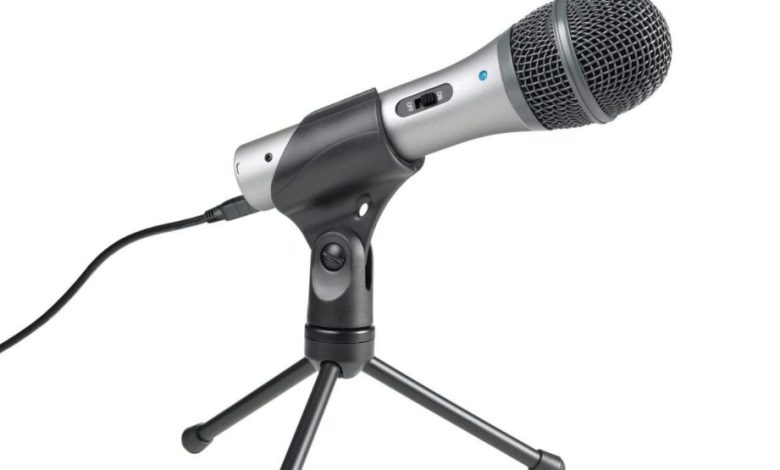
USB microphones and 3.5mm microphones are two popular options for recording audio. Both have their own advantages and disadvantages, and choosing between them can be a difficult decision. In this article, we will explore the differences between USB and 3.5mm microphones and help you decide which one is better suited for your needs.
One of the main advantages of USB microphones is their ease of use. They can be plugged directly into your computer’s USB port without the need for any additional hardware or software. This makes them a convenient option for those who want to record audio quickly and easily. On the other hand, 3.5mm microphones require a sound card or audio interface to connect to your computer, which can be more complicated to set up.
However, when it comes to audio quality, the debate between USB and 3.5mm microphones is still ongoing. Some argue that USB microphones offer better digital audio quality, while others claim that 3.5mm microphones provide a more natural and authentic sound. In the next section, we will dive deeper into the pros and cons of each type of microphone to help you make an informed decision.
Understanding USB and 3.5mm Mics
When it comes to choosing between a USB mic and a 3.5mm mic, it’s important to understand the differences between the two. Both types of microphones have their pros and cons, and the decision ultimately depends on your specific needs and preferences.
USB Microphones
USB microphones are becoming increasingly popular due to their convenience and ease of use. They are plug-and-play devices, meaning you can simply plug them into your computer’s USB port and start recording. This eliminates the need for an external audio interface or sound card.
One of the main advantages of USB microphones is their affordability. They are generally less expensive than other types of microphones, making them a great option for beginners or those on a tight budget.
Another advantage of USB microphones is their versatility. They can be used for a variety of recording applications, such as podcasting, voiceovers, and music production.
However, USB microphones do have some drawbacks. They are limited by the quality of your computer’s sound card, which can result in lower audio quality compared to other types of microphones. Additionally, they can be prone to latency issues, which can cause a delay between what you say and what you hear.
3.5mm Microphones
3.5mm microphones, also known as analog microphones, are the traditional type of microphone that uses a 3.5mm jack to connect to your computer or other recording device. They require an external audio interface or sound card to function properly.
One of the main advantages of 3.5mm microphones is their superior audio quality. They are capable of capturing more detail and nuance in your recordings, making them a great option for professional recording applications.
Another advantage of 3.5mm microphones is their compatibility with a wide range of recording equipment. They can be used with mixers, preamps, and other audio gear to achieve the desired sound.
However, 3.5mm microphones do have some drawbacks. They tend to be more expensive than USB microphones, and they require additional equipment to function properly. This can make them less convenient and more difficult to set up and use.
both USB and 3.5mm microphones have their advantages and disadvantages. When choosing between the two, it’s important to consider your specific needs and preferences. If you’re on a tight budget and need a versatile microphone for basic recording applications, a USB microphone may be the best choice. However, if you require superior audio quality and have the necessary equipment, a 3.5mm microphone may be the better option.
Comparing Sound Quality
USB Mics
USB microphones are digital and use the USB port to transmit data to the computer. They have an in-built analog-to-digital converter (ADC) that converts the microphone’s analog signal to a digital signal. This means that the quality of the audio is not affected by the computer’s sound card or other hardware.
The sound quality of USB mics is generally good, and they are capable of producing clear and crisp audio. They are also easy to use and do not require any additional hardware or drivers.
However, USB microphones can be affected by electromagnetic interference (EMI) from other devices connected to the computer. This can result in unwanted noise or distortion in the audio.
3.5mm Mics
3.5mm microphones, also known as analog microphones, use the 3.5mm audio jack to connect to the computer. They do not have an in-built ADC, so the computer’s sound card or other hardware is responsible for converting the analog signal to digital.
The sound quality of 3.5mm microphones can vary, depending on the quality of the sound card or other hardware. They are generally less expensive than USB microphones, but they may require additional hardware such as an audio interface to achieve good sound quality.
3.5mm microphones can also be affected by EMI, just like USB microphones. However, they are generally less susceptible to interference because they use an analog connection instead of a digital one.
both USB and 3.5mm microphones can produce good sound quality, but USB microphones are generally easier to use and do not require additional hardware. 3.5mm microphones may require additional hardware to achieve good sound quality, but they are generally less expensive. Ultimately, the choice between USB and 3.5mm microphones depends on your specific needs and budget.
Ease of Use
When it comes to ease of use, both USB and 3.5mm microphones have their advantages and disadvantages.
USB microphones are generally easier to use because they can be connected to almost any device with a USB port. This means that you can easily switch between devices without having to worry about compatibility issues. Additionally, most USB microphones are plug-and-play, which means that you don’t need to install any drivers or software to use them.
On the other hand, 3.5mm microphones can be a bit more complicated to use. They require a device with a 3.5mm audio jack, which is not always available on all devices. If your device doesn’t have a 3.5mm jack, you may need to purchase an adapter or use a different microphone altogether.
However, once you have a device with a 3.5mm jack, using a 3.5mm microphone is generally straightforward. You simply plug the microphone into the jack and start recording. Additionally, 3.5mm microphones don’t require any power source, which means that you don’t need to worry about battery life or charging.
both USB and 3.5mm microphones are easy to use, but USB microphones have a slight edge in terms of compatibility and plug-and-play functionality. However, if you have a device with a 3.5mm jack and don’t want to deal with the hassle of adapters or compatibility issues, a 3.5mm microphone may be a better choice for you.
Portability and Convenience
When it comes to portability and convenience, USB microphones are generally the better option. They are designed to be plug-and-play, which means you can simply connect them to your computer or mobile device and start recording right away. On the other hand, 3.5mm microphones require a separate audio interface or sound card to connect to your device, which can be cumbersome and inconvenient.
USB microphones are also typically more compact and lightweight than their 3.5mm counterparts, making them easier to carry around and use on the go. They often come with their own stands or clips, which means you don’t need to worry about purchasing additional accessories to use them.
Another advantage of USB microphones is that they are compatible with a wide range of devices, including computers, laptops, tablets, and smartphones. This makes them a versatile choice for anyone who needs to record audio on multiple devices.
if you value portability and convenience, a USB microphone is likely the better option. However, it’s important to keep in mind that there are other factors to consider when choosing a microphone, such as sound quality and price.
Price Comparison
When it comes to price, USB microphones tend to be more expensive than their 3.5mm counterparts. This is because USB microphones have built-in analog-to-digital converters, which convert the analog audio signal to a digital signal that can be processed by your computer. This added technology comes at a cost.
However, it’s important to note that there are still affordable options available for both types of microphones. Here’s a quick comparison of some popular USB and 3.5mm microphones and their prices:
USB Microphones:
- Blue Yeti: $129
- Audio-Technica AT2020USB+: $149
- Samson Meteor Mic: $69
3.5mm Microphones:
- Zalman ZM-Mic1: $9.99
- Movo PM10 Deluxe Lapel Clip-on Omnidirectional Condenser Microphone: $14.95
- Fifine Metal Condenser Recording Microphone: $29.99
As you can see, there are affordable options available for both types of microphones. However, if you’re looking for a high-quality microphone with advanced features, you may need to spend more money on a USB microphone.
Ultimately, the price of a microphone will depend on your needs and budget. If you’re just starting out and don’t have a lot of money to spend, a 3.5mm microphone may be a good option. But if you’re looking for professional-quality audio and advanced features, a USB microphone may be worth the investment.
Compatibility with Devices
When it comes to compatibility, USB microphones have an advantage over 3.5mm microphones. USB microphones are designed to work with a wide range of devices, including computers, laptops, and tablets. They are plug-and-play and do not require any special drivers or software to work. This makes them a convenient option for those who need to use their microphones on multiple devices.
On the other hand, 3.5mm microphones can be limited in their compatibility. They require a device with a 3.5mm jack, which is not always available on newer devices. Additionally, some devices may require an adapter to use a 3.5mm microphone, which can be an inconvenience.
It is worth noting that some 3.5mm microphones come with a USB adapter, which can expand their compatibility. However, this can add an extra cost and may not be as convenient as a dedicated USB microphone.
when it comes to compatibility, USB microphones are the more versatile option. They can work with a wider range of devices without requiring any additional hardware or software.
Durability and Lifespan
When it comes to durability and lifespan, USB microphones tend to be more reliable than their 3.5mm counterparts. This is because USB microphones are designed to withstand more wear and tear than 3.5mm microphones.
One reason for this is that USB microphones typically have a more robust build quality. They are often made with higher-quality materials and are designed to be more durable. In contrast, 3.5mm microphones are often made with cheaper materials and are more prone to breaking or malfunctioning.
Another reason why USB microphones tend to be more durable is that they are less prone to interference. 3.5mm microphones are susceptible to interference from other electronic devices, which can cause them to malfunction or stop working altogether. USB microphones, on the other hand, are less prone to interference and are therefore more reliable.
In terms of lifespan, USB microphones also tend to last longer than 3.5mm microphones. This is because USB microphones are designed to be more energy-efficient, which means they consume less power and generate less heat. As a result, they are less likely to wear out or break down over time.
if you’re looking for a microphone that is durable and long-lasting, a USB microphone is likely your best bet. While 3.5mm microphones may be cheaper, they are often less reliable and may need to be replaced more frequently.
Final Verdict
After comparing USB and 3.5mm microphones, it is clear that both have their advantages and disadvantages. Ultimately, the choice between the two will depend on your specific needs and preferences.
If you are looking for convenience and ease of use, a USB microphone may be the better choice. These microphones plug directly into your computer’s USB port and often come with built-in sound cards, eliminating the need for additional equipment. They are also generally more affordable than 3.5mm microphones.
However, if you are looking for higher quality audio and more control over your sound, a 3.5mm microphone may be the better option. These microphones often have better sound quality than USB microphones and can take advantage of the features included in your computer’s sound card, such as special effects. They also allow for more customization and control over your sound.
It is important to note that there are many factors that can affect the quality of your audio, including the quality of the microphone itself, the environment in which you are recording, and the software you are using. Therefore, it is important to do your research and choose a microphone that fits your specific needs and budget.
there is no clear winner in the USB vs. 3.5mm microphone debate. Both types of microphones have their pros and cons, and the best choice for you will depend on your individual needs and preferences.
Conclusion
both USB and 3.5mm microphones have their own advantages and disadvantages. USB microphones are more convenient and compatible with most devices, while 3.5mm microphones offer better sound quality and special effects.
If you are looking for a microphone that is easy to use and affordable, a USB microphone might be the best option for you. However, if you are a professional or an audiophile looking for the best sound quality, a 3.5mm microphone might be a better choice.
Ultimately, the decision between a USB and a 3.5mm microphone depends on your needs and preferences. It is important to consider factors such as sound quality, convenience, compatibility, and cost before making a decision.
We hope this article has provided you with valuable insights and helped you make an informed decision on which microphone to choose.


