

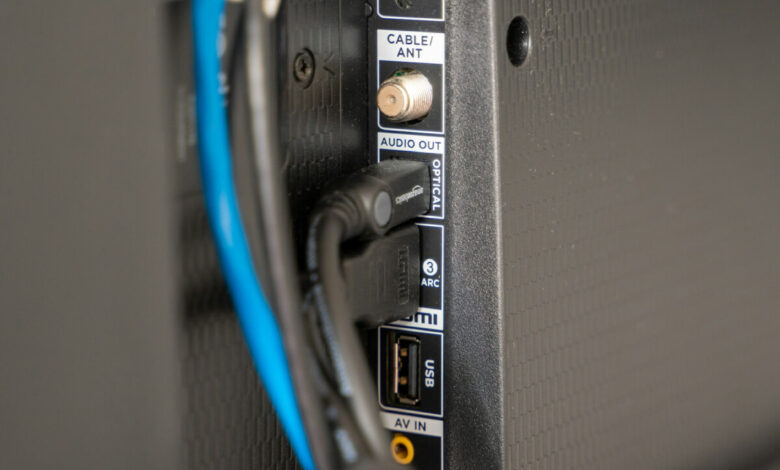
If your TV's sound cuts out over HDMI ARC and comes back the moment you unplug and replug the cable, the cable is not usually the problem. ARC devices negotiate a shared audio format every time the connection comes up, and replugging forces that negotiation to happen again, which is why it always works and never lasts. The real fix depends on when the drop happens: switching apps points to format negotiation, another device powering on points to CEC, random timing points to the cable or port, and specific shows point to a bandwidth limit. Match your pattern below before you touch anything.
Why replugging works, and what that tells you
HDMI ARC is not a passive wire that either carries sound or does not. It is a negotiated link. When your TV and soundbar (or receiver) connect over ARC, they exchange information about what audio formats each side can send and accept, and they settle on one. That exchange is called the handshake, and it happens once, at connection time, not continuously.
Most of the time this works invisibly. The problem shows up when something disturbs the state both devices agreed on, without either device realizing the agreement needs to be renegotiated. The result is silence: the physical link is still there, but the audio session running on top of it has stalled. Unplugging and replugging the cable forces both ends to drop the connection and start the handshake over from scratch, which is why it reliably restores sound.
That is the important part to internalize before you go looking for fixes: replugging working is not evidence that the cable was loose. It is evidence that the handshake is unstable and needs to be forced to restart. A cable fault can also cause this, but so can several other things that have nothing to do with the physical connection, and treating "replug fixes it" as proof of a bad cable sends a lot of people straight to buying a new one that changes nothing.
This is also why generic advice like "power cycle everything" works about as often as it fails. It restarts the handshake, but it does not tell you why the handshake broke in the first place, so the same drop comes back on its own schedule. The pattern of when it happens is the actual diagnostic tool.
When does it drop? The pattern names the cause
Before trying anything, watch the TV for a few days and note what is happening right before the sound cuts. There are four distinct patterns, and each one points at a different layer of the connection:
- It drops when you switch app, input, or content. This is a format negotiation problem. The source is changing what format it sends mid-session, and the chain is failing to renegotiate cleanly.
- It drops when another device in the chain powers on or off, or when you use its remote. This is a CEC problem. Devices are sending each other control commands, and one of those commands is disrupting the audio session as a side effect.
- It drops at random, with no trigger you can identify, sometimes mid-scene. This points to something physical: the cable, the port, or a marginal cable that is passing video correctly and failing audio.
- It drops only during specific content, like an Atmos soundtrack or a particular streaming app, but not during normal TV audio. This is a bandwidth ceiling. The content is asking for more than plain ARC can carry.
Each pattern has a different fix, in the sections below, in that order.
Drops on content or app changes: format negotiation
If the dropout tracks with switching between apps, inputs, or even scenes within the same show, the source device is changing the audio format it sends and the ARC link is not renegotiating fast enough or cleanly enough to keep up. A streaming app might send Dolby Digital Plus for one title and switch to plain stereo for another, or a game console might jump between formats depending on what is running, and every jump is a fresh negotiation the ARC link has to complete without an audible gap.
The fix is to stop asking the chain to renegotiate mid-session. Go into the source device's audio output settings (the streaming box, console, or TV's own smart platform) and lock the audio output to a single, fixed format instead of leaving it on "Auto" or "Bitstream, format detected automatically." Dolby Digital 5.1 is a safe, widely supported fixed choice for most ARC setups. You lose the automatic switch to whatever the highest format available is, but you also stop asking the connection to renegotiate every time content changes, which is usually what is actually breaking.
If you only notice the drop right after a firmware update on the TV or the source device, that is the same category of problem: check for a newer firmware version on both ends before doing anything else, since format-handling bugs are commonly patched.
Drops when another device powers on: CEC
If the dropout coincides with another device in the chain turning on, going to standby, or with pressing buttons on a different remote, look at HDMI-CEC. CEC is the standard that lets one remote control multiple HDMI devices: turning on your soundbar can wake the TV, pressing volume on the TV remote can adjust the soundbar, and so on. Every TV brand has its own name for its CEC implementation, including Anynet+ on Samsung, Bravia Sync on Sony, and SimpLink on LG, and receivers and soundbars from other manufacturers each have their own equivalent.
CEC is genuinely useful when it works, which is exactly why people are reluctant to touch it. But CEC commands and the ARC audio handshake share the same physical link, and a device issuing a control command at the wrong moment can interrupt the audio session running alongside it. This is not a cable fault or a format problem; it is two protocols colliding on one connection.
The way to confirm this is the cause, without committing to giving up CEC permanently, is to disable it on one device at a time and watch whether the drops stop. Turn off CEC on the TV first (menu naming varies by brand, but it is usually under a general or connections settings menu), leave everything else as is, and use the system normally for a day or two. If the drops disappear, you have your cause, and you can decide whether losing one-remote convenience is worth the tradeoff, or whether you would rather live with the occasional drop. If they do not disappear, re-enable CEC on the TV and try the same test on the soundbar or receiver instead. Treat this as a reversible diagnostic step, not a permanent setting you are being told to accept.
Drops at random: the cable and the port
If the dropout has no pattern you can tie to an app, a device powering on, or specific content, and it just happens, the most likely cause is physical: the cable, the connector seating, or the port itself.
Here is the point that gets stated backward almost everywhere: a marginal HDMI cable very often keeps the picture perfectly intact while dropping the audio. Video and audio share the same HDMI link but are not equally sensitive to signal quality, and a cable that is borderline (loose shielding, a cheap connector, physical damage from being bent tightly behind a TV mount) can pass video cleanly while failing to carry the audio stream reliably. That means "the picture never glitches, so the cable is fine" is a false conclusion, and it is the reason so many people rule out the cheapest, easiest fix first, right when it is often the correct one.
Before replacing anything, try these in order:
- Reseat both ends of the cable firmly. A connector that looks fully seated can still be sitting slightly loose.
- Try a different HDMI port on the TV, if the TV has more than one ARC-capable port, or confirm you are using the port actually labeled for ARC or eARC (it is usually not interchangeable with the others).
- Swap in a different cable, ideally one labeled "High Speed HDMI cable" or "Premium High Speed HDMI cable" per the HDMI specification, which is the certification tier meant to reliably carry ARC audio alongside video.
- If you have another HDMI cable already in use elsewhere in the house that you know works, borrow it for a clean test rather than buying a new one first.
If the drops stop with a different cable or a different port, you have your answer, and it was never the format settings or CEC at all.
Drops only on certain shows: an ARC bandwidth ceiling
If the dropout only happens with specific content, such as a movie mixed in Dolby Atmos or a particular app that streams in a heavier format, and everyday TV audio is fine, you are likely running into a limit built into plain ARC rather than a fault.
Standard ARC, defined under the HDMI 1.4 specification, has enough bandwidth for compressed surround formats like Dolby Digital and DTS, and it can carry a lossy version of Atmos layered over Dolby Digital Plus. It does not have the bandwidth for the full lossless formats: Dolby TrueHD with Atmos, or DTS:X in its uncompressed form. When a source tries to push more than plain ARC can carry, the result is not always a clean fallback to a lower format; on some gear it shows up as an intermittent dropout or a repeated failed handshake instead, especially on demanding scenes.
eARC, which requires the HDMI 2.1 specification on both the TV and the connected device along with a certified cable, removes this ceiling and carries the full lossless formats without the same bandwidth pressure. If your setup supports it, switching to eARC (where the port and both devices allow it) can resolve dropouts that are actually a bandwidth problem being misread as a flaky connection. If your gear does not support eARC, setting the source to a fixed, compressed format as described earlier is the practical workaround. For the full breakdown of what ARC and eARC each carry and whether upgrading is worth it for your setup, see our guide on HDMI ARC vs eARC.
It is also worth ruling out a much simpler mix-up here: not every HDMI port on a TV is an ARC port, and plugging a soundbar into an ordinary HDMI input will not carry return audio at all, regardless of cable quality. If you are not certain your soundbar is connected to the correct port, our guide on using HDMI ARC as a regular HDMI port covers exactly which ports do what and where people get this wrong.
What to do if none of it holds
If you have tried locking the source format, disabling CEC as a test, swapping the cable and port, and the content causing the drop is not especially demanding, step back and consider whether the fault is a firmware bug specific to your TV or soundbar model rather than something you can fix through settings. Manufacturer support pages and forum threads for your exact model are worth a search at this point, since ARC firmware bugs are common enough that they get patched more often than they get permanently fixed by users.
In the meantime, or if you would rather stop troubleshooting ARC altogether, an optical (TOSLINK) cable is a reliable fallback for standard surround sound, since it is a simpler, one-directional connection with no handshake to fail. It cannot carry Atmos or the newer lossless formats, but it will not intermittently drop the way an unstable ARC handshake can. If your TV has dropped its optical port entirely, our guide on connecting a TV to a receiver without ARC covers the alternative wiring paths that still work.
One more thing worth ruling out if your soundbar goes completely and permanently silent rather than intermittently: that is a different problem with a different fix path, covered in our optical troubleshooting guide below, not this one.
Frequently asked questions
Does unplugging and replugging the HDMI cable actually fix anything, or just delay the problem?
It genuinely restores sound, because it forces both devices to restart the ARC handshake from scratch. But it is a workaround, not a repair: it does not address whatever made the handshake unstable in the first place, so the drop will return under the same trigger.
Is a new, more expensive HDMI cable guaranteed to fix intermittent ARC dropouts?
No. A cable swap only fixes the problem if the cause is physical, meaning a marginal cable or a loose connection. If the dropout is caused by format negotiation, CEC, or a bandwidth ceiling, a new cable will not change anything, even a certified one.
Should I just turn off HDMI-CEC permanently?
Only if disabling it stops the drops during your test and you are comfortable losing one-remote convenience. Treat it as a diagnostic step first: turn it off on one device, confirm whether the problem stops, then decide.
Why does the sound drop only during Dolby Atmos content but not regular TV audio?
This usually means you are hitting the bandwidth limit of standard ARC under the HDMI 1.4 specification, which was not built to carry the full lossless Atmos or DTS:X formats. Upgrading to eARC under HDMI 2.1, if your gear supports it, is the direct fix; locking your source to a compressed format is the workaround if it does not.
My soundbar has no sound at all over optical, not an intermittent ARC drop. Is this the same issue?
No. Total silence over an optical connection is a different failure with a different fix order, covered in our dedicated optical audio troubleshooting guide, separate from the intermittent ARC dropout covered here.
Related reading
For the full picture of where audio can break between your source, TV, and speakers, start with our TV sound chain hub, which maps every failure point in the chain and links to the specific fix for each one.


