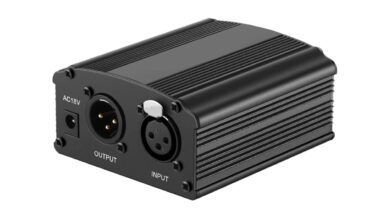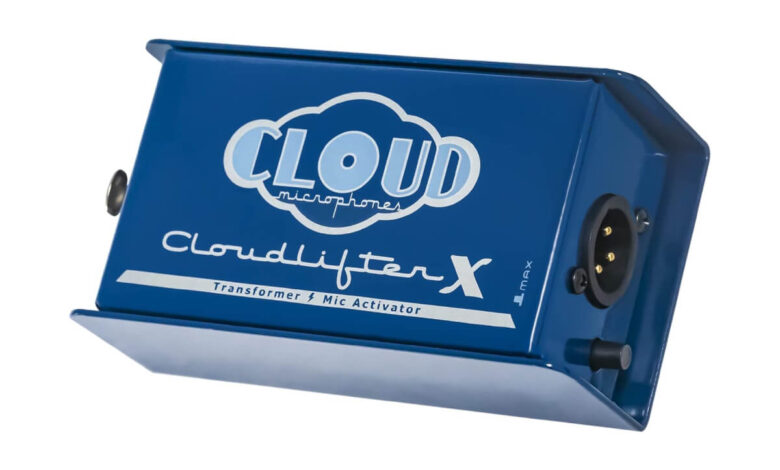
Do I need a cloudlifter? You need one when a low-output microphone, most often a passive dynamic or ribbon mic like the Shure SM7B, still sounds thin, hissy or buried in noise even with your audio interface’s preamp turned most of the way up. A cloudlifter sits between that mic and your interface, draws on the interface’s own 48V phantom power, and adds clean gain before the signal ever reaches the preamp. If you record with a condenser mic, or your interface already drives your current mic cleanly at a moderate gain setting, you almost certainly don’t need one.
What a cloudlifter actually does to the signal
A cloudlifter is not a preamp in the sense your interface has one. It is an inline gain stage that sits in the XLR run between the microphone and the interface’s input, and it does one job: raise the level of a weak signal before it hits the interface’s own preamp circuit. Cloud Microphones’ own product page for the CL-1, lists the unit at up to +25 dB of gain with a 3k Ohm input impedance, built around Class-A discrete JFET circuitry rather than the op-amp designs common in interface preamps.
The mechanism matters more than the number. Passive dynamic and ribbon mics produce a genuinely small voltage, so a preamp has to apply a lot of gain to bring that voltage up to a usable recording level. Every gain stage adds some of its own noise along with the signal it amplifies, and pushing one stage to its upper limit amplifies its noise floor right along with your voice. A cloudlifter moves part of that amplification earlier in the chain, at a stage designed to add very little noise of its own, so the interface’s preamp then has less work left to do and can sit in a quieter part of its own gain range.
Do I Need a Cloudlifter? Quick Signs You Do
Run through these before spending anything:
- Your microphone is a passive dynamic or ribbon design (SM7B, RE20 and similar broadcast dynamics are the common case). Active mics and most condensers already have enough built-in output.
- Your interface’s gain knob is at or near maximum and the recorded voice is still quiet relative to the noise floor.
- You hear a hiss or hum that gets louder as you raise the gain, not just louder speech.
- Your interface is a budget or older USB unit with a known weak preamp for low-output mics, a pattern widely reported for entry-level interfaces paired with the SM7B specifically.
- You’ve already ruled out a bad cable, a loose XLR connection or an incorrect input gain setting, since those produce the same symptom for free.
When you probably don’t need one
Condenser microphones already put out a much hotter signal than passive dynamics, so a cloudlifter adds little there and, because most cloudlifters do not pass phantom power through to the microphone, using one with a condenser can leave the condenser without the power it needs to work at all. If your interface or mixer has a genuinely strong, low-noise preamp already, and your current mic records at a healthy level with the gain well short of maximum, a booster has nothing to fix. It is also not a fix for a bad recording room, a mic placed too far from your mouth or a cheap cable; those problems sit earlier in the chain and no amount of clean gain corrects them.
The phantom power question
Read this before you enable anything. Standard 48V phantom power can damage ribbon microphones that are not built to tolerate it, and it can also damage some dynamic mics that are not rated for it, so check your specific microphone’s own manual before you turn phantom power on for any device on that channel. Most modern passive ribbon mics are wired to survive phantom power in normal use, but the real risk sits at the moments the connection changes: Royer Labs’ own explainer on ribbon mics and phantom power, describes the danger as coming from a brief voltage transient as an XLR connector is plugged or unplugged while phantom power is live, from a miswired or shorted cable putting unequal voltage on the two signal pins, or from cross-patching a ribbon mic through a patch bay with phantom power still on. The practical habit that avoids all three: connect the mic first, then switch phantom power on, and switch it off before you disconnect anything.
A cloudlifter changes this calculus in a useful way. Because a unit like the CL-1 draws phantom power for its own circuit but does not pass it on to the microphone, it lets you supply the 48V your interface needs to send without exposing a passive ribbon or dynamic mic to that voltage at all.
Cloudlifter versus just turning up the gain
Turning the interface’s own gain knob higher is the free option, and it works right up until the preamp runs out of clean range, at which point it is amplifying its own noise floor along with your voice at the same ratio it always did. A cloudlifter does not give you gain with zero noise attached, since no real circuit does that, but it moves the heavy lifting to a stage built specifically for a low-noise boost, which is a different trade-off than maxing out a general-purpose preamp. How much difference it makes in practice depends heavily on your specific interface: a unit with a genuinely quiet preamp and a wide clean gain range benefits less, while a budget interface known to run noisy near maximum gain sees a bigger, more audible improvement. That is also why an inline booster is worth trying before an outboard preamp upgrade that costs several times as much for the same low-output mic.
Where a cloudlifter fits in the bigger signal chain
This is the same logic behind most audio troubleshooting: the problem is rarely where the symptom shows up. A soundbar with dialogue that sounds too quiet usually needs a source-level fix rather than the volume knob turned up further, and TV audio that has drifted out of sync with the picture gets solved by finding which single device in the chain introduced the delay, not by nudging every setting at once. A weak mic signal follows the same rule: identify the one stage that is actually starved for clean gain instead of compensating everywhere at once. And once you do add gain anywhere in a chain you are monitoring, remember that whatever you hear back gets louder too, so it is worth knowing how loud is genuinely safe on headphones before you push levels up to compensate for a quiet source.
What to check before you buy one
Confirm your microphone is genuinely low-output (passive dynamic or ribbon), confirm your interface’s gain is already close to its ceiling with that mic, and read your specific mic’s manual for any phantom power caution before you connect anything to a channel with phantom power enabled. If all three line up, an inline booster addresses the actual bottleneck. If your mic is a condenser, or your gain knob still has plenty of headroom left, the fix you need is somewhere else in the chain, not an inline booster.
FAQ
Does a cloudlifter work with a condenser microphone?
Generally no. Condenser mics need phantom power to operate, and most cloudlifters consume the interface’s phantom power for their own circuit rather than passing it through, so a condenser connected downstream can be left without the power it needs.
Will a cloudlifter add its own noise to the recording?
Every gain stage adds some noise, and a cloudlifter is no exception, but it is built specifically for low-noise gain ahead of the preamp, so the net effect for a low-output mic is usually a cleaner result than maxing out the interface’s own gain alone.
Can I leave phantom power on all the time if I only use a dynamic mic?
Check that mic’s manual first. Many dynamic mics tolerate phantom power without issue, but some are not rated for it, and the safer general habit is connecting the mic before switching phantom power on and switching it off before disconnecting.
Is a cloudlifter the same thing as a preamp?
No. It is an inline gain stage that boosts the signal before it reaches your interface’s actual preamp; it does not replace the preamp or the analog-to-digital conversion that happens after it.
Are alternatives like the Triton FetHead the same idea?
Yes, in-line phantom-powered boosters from other makers work on the same principle: draw 48V from the interface, add clean gain ahead of the preamp, and in most designs do not pass phantom power on to the microphone. Specifications differ by model, so check each maker’s own listing before assuming numbers carry across.
The short version
A cloudlifter earns its place when a passive dynamic or ribbon mic is starved for clean gain and your interface’s own preamp has nothing left to give. It is not a fix for a condenser mic, a noisy room or a bad cable, and it is not free gain, it is a low-noise gain stage placed earlier in the chain than your preamp’s own limit. Check your mic’s manual for phantom power tolerance first, confirm the gain knob is genuinely maxed out before you spend on a fix, and treat the number on any booster’s spec sheet as that maker’s own claim, not a universal figure.